
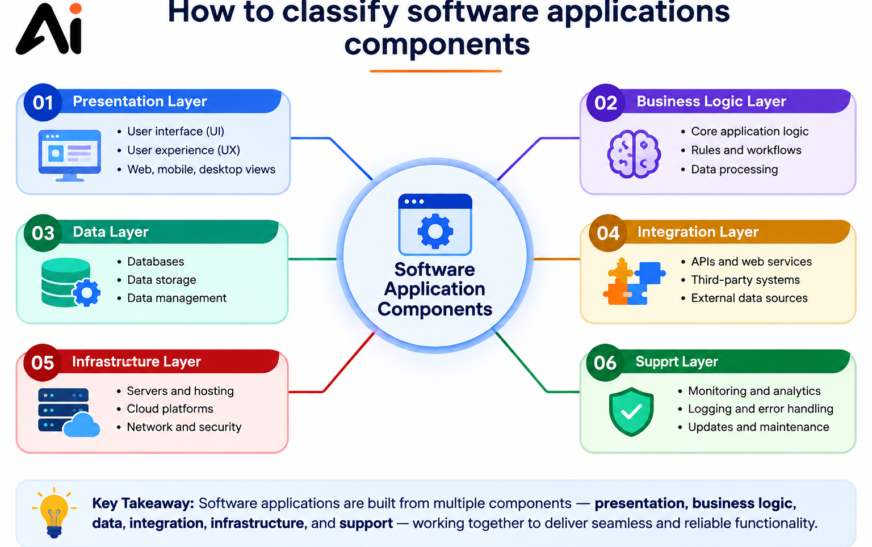
How to classify software applications components involves organizing software into logical categories based on architecture, functionality, execution lifecycle, deployment, and business purpose. Common classifications include user interface components, business logic components, data access components, integration services, and security modules. Understanding how to classify software applications components helps developers build scalable, maintainable, and secure software systems while improving collaboration and system performance.
Key Takeaways
- How to classify software applications components starts with identifying each component’s role within the software architecture.
- Software components can be classified by architecture layer, functionality, execution lifecycle, deployment model, and business value.
- The main architectural categories include presentation, business logic, data access, integration, and security components.
- Application software is commonly classified into general-purpose, specialized, and customized software.
- Real-world examples such as e-commerce, banking, and healthcare systems demonstrate effective software component classification.
- Using a structured classification approach improves software scalability, maintainability, security, and development efficiency.Understanding software architecture and component relationships helps teams design modular and reusable applications.
Understanding Software Application Component
What Are Software Application Components?
To understand how to classify software applications components, you first need to know what software application components are. These are individual building blocks that work together to create a complete software application. Each component performs a specific task, such as managing the user interface, processing business logic, handling databases, or connecting with external services through APIs.
In software engineering, well-designed software application components improve performance, simplify maintenance, and support a scalable application architecture.
Why Is Software Component Classification Important?
Learning how to classify software applications components helps developers organize systems based on their functionality, architecture, deployment, and business purpose. Proper software component classification makes applications easier to develop, test, maintain, and scale. It also supports component-based software engineering by encouraging the reuse of modules across multiple projects.
A strong software architecture ensures every component has a clear responsibility, reducing complexity and improving system reliability. Whether you’re building a web application, mobile app, or enterprise solution, understanding how to classify software applications components is essential for creating secure, modular, and high-performing software systems that can adapt to future business and technology requirements.
Core Components of a Software Application
Understanding the different types of software application components is essential before learning how to classify software applications components. Every software system consists of several core components that perform specific tasks. The presentation layer handles the user interface and user experience, while the business logic components process data, enforce business rules, and execute workflows.
Data access components communicate with databases to store, retrieve, and update information. Integration components connect the application with third-party services through APIs, web services, or middleware, and security components manage authentication, authorization, and data protection. Together, these components create a reliable and scalable software solution.
How Different Components Work Together
A well-designed software architecture ensures that each component has a clear responsibility while working seamlessly with the others. For example, when a user submits an online order, the user interface collects the information, the business logic validates the request, the data access layer saves it to the database, and the integration component processes the payment through an external gateway.
This structured approach demonstrates how to classify software applications components based on their roles and responsibilities. Proper software component classification improves system performance, simplifies maintenance, supports reusable software components, and enables developers to build secure, scalable, and efficient applications.
Classification of Application Software
The Three Main Types of Application Software
Another important part of understanding how to classify software applications components is learning the classification of application software. Application software is generally divided into three types of application software: general-purpose software, specialized software, and customized software.
General-purpose software includes everyday tools like word processors and web browsers. Specialized software is designed for specific industries, such as accounting or graphic design, while customized software is developed to meet the unique needs of a particular business or organization.
Why Application Software Classification Matters
The classification of application software helps businesses and developers choose the right solution for different tasks and industries. It also supports better software planning, maintenance, and upgrades.
Understanding how to classify software applications components alongside application software categories allows developers to design efficient software architecture, improve software quality, and create scalable applications that meet both Technology related and business requirements.
Understanding the Classification of Application Software
Every application is created to solve a specific problem, which is why software is divided into different categories based on its purpose and functionality. For example, Microsoft Word is designed for document creation, Google Chrome provides web browsing, Adobe Photoshop focuses on graphic design, while Zoom and WhatsApp enable seamless communication. Business applications like Microsoft Excel, Slack, and accounting software help organizations manage daily operations more efficiently.
Understanding the classification of application software makes it easier to identify where each application belongs and how it serves users. As you explore 5 examples of application software, 10 examples of application software, or even larger collections, you’ll notice that every program is built from specialized components working together. This knowledge also helps you understand how to classify software applications components, making it easier to design, manage, and maintain modern software systems with greater efficiency and scalability.
Examples of Application Software
Application software is available in a wide range of categories, each designed to meet specific user and business needs. Office applications such as Microsoft Word and Excel help create documents and manage data, while web browsers like Google Chrome and Mozilla Firefox provide access to online resources. Developers rely on tools such as Visual Studio Code and IntelliJ IDEA to build software, whereas graphic designers use Adobe Photoshop, Illustrator, Canva, and Figma for creative projects.
Collaboration platforms like Microsoft Teams, Slack, and Zoom support communication and teamwork, while cloud services including Google Drive, Dropbox, and OneDrive simplify file storage and sharing. Security software protects systems from cyber threats, accounting applications manage financial records, project management tools organize workflows, and media software enables audio and video editing. Reviewing a broad range of application software examples helps users understand their purpose, compare features, and select the right solution for personal, educational, or professional use.
Software Architecture Components and Architecture Patterns
Software architecture defines the overall structure of an application and explains how its components interact to deliver reliable performance. Key software architecture components include the presentation layer, business logic layer, data access layer, databases, APIs, security modules, and communication services. Choosing the right application architecture improves scalability, maintainability, and system performance.
Common architecture patterns include layered architecture, which separates application responsibilities into logical layers for better organization and maintainability. Monolithic architecture combines all application functions into a single system, making it suitable for smaller projects. Microservices architecture divides an application into independent services that can be developed, deployed, and scaled separately.
Other widely used patterns include service-oriented architecture (SOA), which enables reusable business services across multiple applications, event-driven architecture, which processes and responds to real-time events, and client-server architecture, where client devices communicate with centralized servers to exchange data and services. Each architecture pattern offers unique advantages and should be selected based on the application’s business goals, scalability needs, and technical requirements.
Best Practices for Software Component Design
Reusable Software Components for Better Maintainability
Designing reusable software components reduces development time and improves consistency across multiple projects. Developers should create components with a single responsibility, making them easier to update, test, and integrate into different applications. Reusability also minimizes duplicate code and supports long-term software maintenance.
Modular Software Architecture and Software Design Principles
A modular software architecture divides an application into independent software modules that perform specific functions. Following software design principles such as the SOLID principles, loose coupling, and high cohesion makes applications more scalable, flexible, and easier to maintain. Well-structured modules also simplify debugging and future enhancements.
Software Maintenance Through Testing, Documentation, and Security
Effective software maintenance depends on comprehensive testing, clear documentation, and strong security practices. Regular code reviews, automated testing, updated documentation, and secure coding standards help identify issues early, protect sensitive data, and ensure software remains reliable as business requirements evolve.
Best Practices for Software Component Design
Creating reusable software components is essential for building scalable, maintainable, and efficient applications. A modular software architecture divides an application into independent software modules, making development, testing, and future updates much easier.
Following software design principles such as the SOLID principles, loose coupling, and high cohesion improves code quality and reduces unnecessary dependencies between components. Regular software testing, clear technical documentation, and secure coding practices help identify issues early and enhance overall software quality.
By adopting these best practices, development teams can simplify software maintenance, improve collaboration, reduce development costs, and deliver reliable applications that adapt easily to changing business requirements.
Common Mistakes in Software Component Classification
Incorrect software component classification can create problems in software quality, performance, and maintenance. Poor planning and weak architecture decisions often make applications harder to manage and upgrade. Common mistakes include:
- Tight coupling: Components become highly dependent on each other, making changes and updates difficult.
- Duplicate components: Recreating similar modules increases complexity and wastes development resources.
- Lack of documentation: Poor documentation makes it harder for developers to understand and maintain software.
- Incorrect categorization: Misclassifying components can affect system organization and future scalability.
- Poor security practices: Weak protection methods can expose applications to security risks.
- Performance issues: Inefficient component design may slow down application performance.
Following proper software design principles, testing practices, and secure software development methods helps prevent these issues.
Benefits of Software Component Classification
Proper software component classification provides several advantages for developers, architects, businesses, and DevOps teams. Key benefits include:
- Better organization: Helps teams manage software components efficiently.
- Improved reusability: Allows developers to reuse existing modules and reduce development time.
- Easier maintenance: Well-classified components simplify updates and troubleshooting.
- Enhanced scalability: Supports application growth and cloud-based solutions.
- Efficient software deployment: Helps DevOps teams automate and manage releases effectively.
- Improved collaboration: Provides a clear structure for development teams.
- Stronger software quality: Encourages better testing, documentation, and security practices.
Overall, component classification supports effective software lifecycle management and helps organizations build reliable, flexible, and maintainable applications.
Conclusion
Understanding how to classify software applications components helps developers, architects, and organizations create better software systems. Proper classification improves software organization, supports reusable components, and makes applications easier to develop, maintain, and scale. By applying software architecture patterns, modular design approaches, and effective component management practices, teams can improve software quality and reduce development challenges.
A well-structured application architecture also supports better security, performance, and collaboration throughout the software lifecycle. Whether building small applications or large enterprise systems, correct software component classification provides a strong foundation for creating reliable, flexible, and future-ready software solutions.
FAQs
What are software application components?
Software application components are independent parts of an application that perform specific functions and work together to deliver complete software solutions.
Why is software component classification important?
Software component classification improves organization, reusability, maintenance, scalability, and overall software quality.
What are common software architecture patterns?
Common patterns include layered architecture, monolithic architecture, microservices architecture, service-oriented architecture (SOA), event-driven architecture, and client-server architecture.
How do reusable software components benefit developers?
Reusable software components reduce development time, minimize duplicate code, and make applications easier to maintain and update.
What are the best practices for software component design?
Best practices include using modular architecture, following SOLID principles, maintaining loose coupling, ensuring high cohesion, performing testing, and keeping proper documentation.