
Modern corporate IT infrastructure spans local server racks, hybrid cloud environments, remote laptops, and decentralized network hardware. Managing these distributed environments manually using standalone scripts or native command-line tools is inefficient and introduces significant security risks.
System administration software provides the centralized control layer necessary to maintain hardware health, deploy updates, regulate user access, and mitigate cyber threats across an entire enterprise.
What Is System Administration Software?
IT infrastructure relies on continuous oversight to maintain operational availability and security compliance. Without centralized software, managing tens or thousands of endpoints requires physical access or fragmented manual connections, creating severe administrative bottlenecks.
Definition of System Administration Software
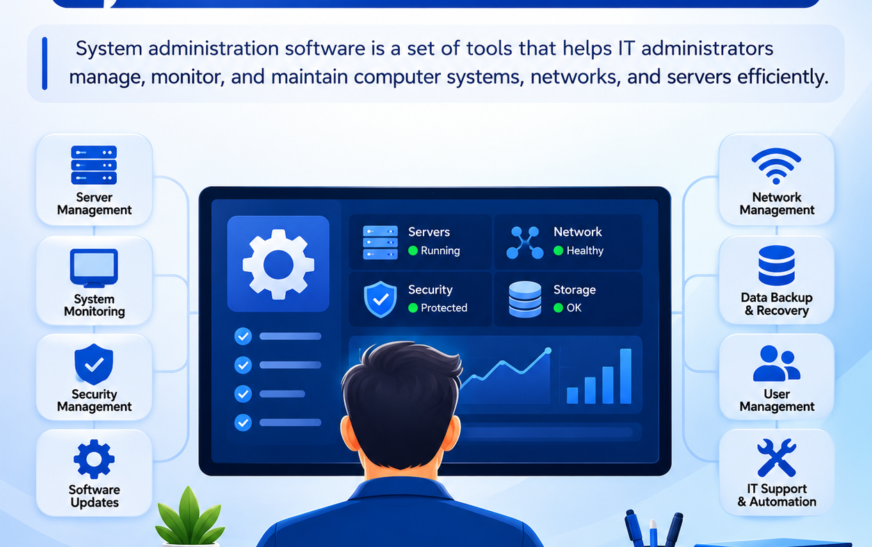
System administration software is a specialized category of management tools designed to monitor, configure, maintain, and secure IT assets from a unified interface. These systems aggregate telemetry data from endpoints, servers, virtual machines, and network hardware to give administrators real-time visibility and automated control over their entire infrastructure.
Rather than logging into individual systems manually, an administrator utilizes this platform to execute bulk commands, enforce security policies, push software packages, and resolve performance bottlenecks across heterogeneous environments running Windows, Linux, macOS, and cloud hypervisors.
Why Is System Administration Software Important?
Unplanned system downtime carries catastrophic financial consequences. Industry telemetry reveals that an hour of infrastructure outage costs large enterprises over $100,000, with severe outages exceeding $1,000,000 per hour in lost revenue and recovery expenses.
Beyond cost mitigation, cyber vulnerabilities present an immediate threat to operational continuity. Cybersecurity research indicates that approximately 57% of successful data breaches exploit known vulnerabilities where a vendor patch was available but not deployed in a timely manner.
System administration software addresses this gap by eliminating manual tracking. It transforms reactive technical support into proactive infrastructure governance by automating routine operational tasks and providing instant visibility into software vulnerabilities, resource constraints, and unauthorized network changes.
What Does System Administration Software Do?
System administration tools execute administrative functions continuously across distributed computing environments. They replace manual intervention with policy-driven automation.
System Monitoring and Performance Management
Continuous hardware and operating system telemetry tracking is essential to prevent system crashes before they impact business operations.
The software tracks critical performance metrics across all connected infrastructure, including:
- CPU Utilization: Tracking processing load spikes to identify runaway processes or capacity deficits.
- Memory Allocation: Monitoring RAM consumption to detect memory leaks in core applications.
- Storage Capacity and I/O: Tracking disk usage trends and read/write latency to prevent storage exhaustion.
- Network Throughput: Measuring bandwidth consumption and packet loss across core interfaces.
User and Access Management
Regulating access to corporate data and computing resources is a core requirement for enterprise security compliance. System administration tools integrate with directory services like Active Directory and LDAP to manage identity lifecycles.
Administrators use these tools to enforce the principle of least privilege, instantly revoking system permissions when employees leave, enforcing multi-factor authentication, and auditing user rights across domain controllers.
Software and Patch Management
Manually installing operating system updates and third-party software across hundreds of endpoints is mathematically impractical for IT teams.
System administration platforms automate this workflow through distinct operational stages:
- Vulnerability Scanning: Comparing installed software versions against national vulnerability databases.
- Patch Testing: Staging update deployments in non-production environments to verify system stability.
- Scheduled Deployment: Pushing operating system patches during designated maintenance windows to avoid operational disruption.
- Compliance Reporting: Generating audit logs proving that critical security patches were applied across all assets.
Remote Device Management
With distributed workforces becoming standard, managing devices outside the corporate firewall requires secure, agent-based remote management capabilities.
The software enables administrators to take full control of off-network laptops, push configuration updates over encrypted channels, wipe compromised endpoints remotely, and troubleshoot end-user issues without requiring a physical office connection.
Security Monitoring and Alerts
Early detection of unauthorized system changes prevents minor security events from escalating into full breaches.
Administration tools monitor event logs, registry modifications, unauthorized privilege escalations, and unexpected outbound network connections. When suspicious activity occurs, the system triggers real-time alerts via SMS, PagerDuty, or email to notify on-call engineers instantly.
IT Task Automation
Repetitive operational procedures consume valuable engineering resources when handled manually.
System administration software automates complex multi-step workflows, including:
- Bulk user onboarding and script execution.
- Nightly system state backups and log rotations.
- Temporary cache purges and disk cleanup routines.
- Automated service restarts upon process failure.
How Does System Administration Software Work?
The operational mechanics of system administration tools depend on distributed telemetry collection, network protocol communication, and centralized processing engines.
Connecting to IT Systems and Devices
System administration platforms establish communication with targeted infrastructure using two primary architectural models: agent-based and agentless management.
Agent-based management requires installing a lightweight service directly on the target machine. This agent runs in the background, executing scripts locally and transmitting telemetry back to the main console over secure TLS-encrypted tunnels.
Agentless management relies on native administrative protocols already present within the operating system or hardware firmware. Administrators configure the system to query endpoints directly using protocols such as:
- SNMP (Simple Network Management Protocol): Used primarily for querying routers, switches, and network appliances.
- WMI (Windows Management Instrumentation) / WinRM: Used for remote management of Windows Server environments.
- SSH (Secure Shell): Used for executing encrypted administrative commands on Linux and Unix hosts.
- IPMI (Intelligent Platform Management Interface): Used for out-of-band management directly at the physical motherboard level.
Collecting System Data
Once a network link is established, the platform gathers hardware metrics, operating system logs, installed application inventories, and active connection tables. Data collection operates via either a push model, where local agents send data at set intervals, or a pull model, where the central server queries endpoints on demand.
Monitoring System Performance
The central management engine processes incoming metric streams and evaluates them against predefined baseline thresholds. If server memory usage remains above 90% for more than five minutes, or if a core system service unexpectedly stops, the monitoring engine flags the condition immediately.
Automating Administrative Tasks
Automation capabilities rely on script execution engines and policy rules. Administrators define conditional logic such as executing a custom PowerShell or Bash script whenever a specific system event occurs. The software distributes these tasks across targeted device groups simultaneously, ensuring uniform configuration across the entire network.
Detecting and Resolving System Issues
Advanced administration tools feature automated self-healing routines. When the system detects a service outage, such as a crashed database engine or an unmounted storage volume, it attempts automated remediation steps before escalating to human engineers.
Common automated remediation workflows include:
- Executing automated service restarts.
- Flushing local DNS caches and resetting network adapters.
- Killing unresponsive, high-CPU child processes.
- Expanding virtual disk allocations dynamically within cloud environments.
Generating Reports and Alerts
To maintain executive visibility and regulatory compliance with frameworks like SOC 2, HIPAA, and ISO 27001, the platform aggregates collected telemetry into structured analytical reports.
Alert routing engines evaluate issue severity to prevent notification fatigue. Low-priority issues like minor disk space warnings route to daily digest logs, while critical infrastructure outages trigger high-priority alerts to on-call administrative staff.
Key Features of System Administration Software
Enterprise-grade administration platforms share a core set of functional capabilities designed to eliminate administrative friction and maintain absolute infrastructure oversight.
Centralized System Management
Fragmented management windows force engineers to context-switch between disparate utilities, increasing the risk of configuration errors.
Centralized management consolidates physical servers, virtual machines, cloud instances, and edge hardware into a single pane of glass. Administrators execute global configuration changes, push enterprise-wide security policies, and monitor system health from one dashboard.
Real-Time Monitoring
Visibility gaps leave organizations vulnerable to unobserved infrastructure failures.
Real-time monitoring engines continuously poll system health metrics, event logs, and network traffic streams. The platform visualizes performance trends via interactive graphs, highlighting hardware degradation or traffic anomalies before they cause user-facing service interruptions.
Remote Administration
Modern IT environments rarely exist within a single physical office space.
Remote administration modules allow engineers to access remote desktops securely, execute command-line utilities, transfer files, and modify system registries across off-network endpoints without requiring a virtual private network session.
Automated Updates and Maintenance
Manual patch deployment fails at scale, leaving systems vulnerable to exploits.
The software automates patch distribution by scanning asset inventories, downloading vendor updates, testing packages against staging rings, and deploying them during approved maintenance windows with minimal administrative oversight.
User and Permission Management
Access control failures expose corporate infrastructure to insider threats and credential compromise.
The platform integrates with directory services to manage user lifecycles, enforce multi-factor authentication, audit credential usage, and apply role-based access control policies across all connected nodes.
Reporting and Analytics
Regulatory compliance demands verifiable proof of system maintenance and security controls.
Analytical engines aggregate historical telemetry and audit logs into structured compliance reports tailored for frameworks such as SOC 2, HIPAA, and ISO 27001, minimizing audit preparation effort.
Types of System Administration Software
Different layers of IT architecture require specialized management platforms designed for specific operating systems and device classes.
Server Management Software
Server infrastructure forms the backbone of enterprise applications, requiring dedicated tools focused on virtualization, resource allocation, and kernel stability.
These platforms monitor physical and virtual server health across Linux and Windows Server distributions, managing container runtimes, hypervisors, and storage area networks.
Network Management Software
Network hardware connects internal infrastructure to the outside world, making availability tracking vital.
Network-focused tools track router performance, switch port utilization, firewall rules, and wireless access point health using protocols like SNMP and NetFlow to map network topologies and detect bottlenecks.
Endpoint Management Software
Managing user-facing hardware like office desktops, remote laptops, and mobile devices requires distinct provisioning capabilities.
Endpoint platforms handle disk encryption enforcement, remote software installation, asset inventory tracking, and operating system deployment for end-user hardware fleets.
Remote Monitoring and Management Software
Managed service providers and internal IT teams rely on RMM platforms to oversee distributed environments.
These tools combine multi-tenant monitoring dashboards, automated ticketing integrations, and remote-control utilities into a unified package optimized for proactive maintenance.
IT Asset Management Software
Hardware and software lifecycles require rigorous tracking to maintain budget compliance and software license accuracy.
ITAM platforms catalog physical hardware serial numbers, monitor software license allocations, track warranty expiration dates, and reconcile inventory depreciation values.
Benefits of Using System Administration Software
Deploying unified system administration tools delivers measurable operational improvements across business technology units.
Improved IT Efficiency
Automating repetitive administrative workflows reallocates engineering hours from manual upkeep to strategic infrastructure projects.
Instead of spending days manually updating server software, administrators deploy updates globally with a few clicks, accelerating service delivery.
Reduced Manual Work
Human data entry and manual script execution introduce configuration drift and operational errors.
Policy-driven automation eliminates manual intervention, ensuring consistent configuration baselines across all managed systems.
Better System Visibility
Siloed monitoring tools create blind spots that obscure root-cause analysis during major incidents.
Unified dashboards aggregate telemetry across all layers, giving IT teams end-to-end visibility into hardware status, network traffic, and software dependencies.
Faster Troubleshooting
When applications fail, mean-time-to-resolution depends heavily on diagnostic speed.
Real-time alerting combined with centralized log aggregation allows engineers to pinpoint failing components instantly, eliminating guesswork during emergency triage.
Enhanced Security
Unpatched software and misconfigured permissions represent primary vectors for cyber attacks.
Automated vulnerability patching, strict access controls, and real-time security alerts harden infrastructure against unauthorized access attempts.
Reduced Downtime
Proactive monitoring and automated self-healing routines prevent minor resource shortages from escalating into complete operational outages.
Services restart automatically and administrators receive warnings before storage volumes fill completely.
Common Use Cases of System Administration Software
System administration tools adapt to various operational challenges across enterprise environments.
Managing Business Devices and Endpoints
IT departments use endpoint tools to provision new employee laptops, enforce corporate security policies, push required productivity applications, and wipe lost or stolen devices remotely.
Monitoring Servers and Networks
Infrastructure teams rely on server and network tools to track uptime metrics, monitor cloud cluster performance, measure bandwidth saturation, and verify database cluster health continuously.
Managing User Accounts and Permissions
Administrators use directory integration modules to onboard new hires, assign role-based access privileges, and immediately revoke system access when employees depart.
Automating Software Updates
Organizations utilize patch management pipelines to deploy monthly operating system updates, third-party application patches, and firmware upgrades without disrupting business operations.
Supporting Remote IT Management
Helpdesk teams leverage remote administration modules to troubleshoot end-user device issues, update software drivers, and resolve configuration errors without physical desk visits.
System Administration Software vs Manual IT Management
Relying on manual tools versus implementing centralized software creates distinct differences in organizational scale and reliability.
| Feature | Manual IT Management | System Administration Software |
| Automation and Efficiency | Relies on manual command-line scripts and individual logins; highly time-consuming. | Executes policy-driven automation and bulk updates across thousands of nodes instantly. |
| Monitoring and Visibility | Fragmented oversight with siloed tools; issues discovered reactively by end users. | Centralized dashboards with real-time telemetry, automated alerts, and proactive health tracking. |
| Scalability and Resource Management | Linear scaling requires proportional increases in headcount; highly error-prone at scale. | Exponential scaling with minimal administrative overhead; enforces uniform configuration baselines. |
How to Choose System Administration Software
Selecting the right platform requires careful evaluation of organizational requirements and technology related constraints.
Compatibility With Existing IT Infrastructure
The chosen software must integrate seamlessly with existing operating systems, cloud providers, and hardware vendors.
Verify that the platform supports the organization’s specific mix of Windows, Linux, macOS, and cloud-native hypervisors before procurement.
Security and Access Controls
Administration platforms hold elevated privileges across the entire enterprise, making security non-negotiable.
Ensure the solution supports robust role-based access controls, multi-factor authentication, and encrypted communication channels for all agent and console traffic.
Automation Capabilities
A platform’s value depends on its ability to eliminate manual work.
Evaluate the flexibility of the software’s scripting engine, support for custom workflows, and availability of pre-built automation templates.
Scalability and Integration
As business operations expand, the management platform must scale without performance degradation.
Look for solutions with open APIs and native integrations with popular ticketing systems like Jira or ServiceNow.
Ease of Use and Cost
Complex interfaces lead to administrative errors and extended training timelines.
Balance feature depth with user interface intuitiveness while factoring in total cost of ownership, including licensing fees, agent costs, and maintenance overhead.
Best Practices for Using System Administration Software
Maximizing the return on investment for administration platforms requires adherence to proven operational disciplines.
Maintain Regular System Updates
Keep the administration platform itself, along with all deployed agents, updated to the latest vendor releases to prevent security vulnerabilities and ensure compatibility with newer operating systems.
Configure Appropriate Access Permissions
Apply the principle of least privilege strictly within the administration console. Limit administrator accounts based on operational necessity to minimize insider threat risks.
Set Up Effective Monitoring Alerts
Avoid notification fatigue by tuning alert thresholds intelligently. Route low-priority warnings to daily logs and reserve high-priority notifications for actionable infrastructure failures.
Automate Repetitive Administrative Tasks
Audit operational workflows regularly to identify manual tasks suitable for automation, such as disk cleanups, log rotations, and routine patch deployments.
Final Thoughts
Managing modern IT infrastructure manually is no longer viable in distributed enterprise environments.
Deploying robust system administration software transforms IT operations from reactive firefighting into proactive governance, ensuring maximum uptime, enhanced security compliance, and long-term organizational stability.
Frequently Asked Questions About System Administration Software
What Is System Administration Software Used For?
It is used to monitor infrastructure health, automate software updates, manage user permissions, enforce security policies, and troubleshoot performance issues across servers, networks, and endpoints from a centralized console.
Is System Administration Software Suitable for Small Businesses?
Yes. While large enterprises rely heavily on these tools, smaller organizations benefit immensely from streamlined remote management, automated patching, and reduced IT support overhead.
Can System Administration Software Manage Remote Devices?
Yes. Modern platforms utilize encrypted cloud relays or lightweight local agents to manage off-network laptops and remote employee devices securely outside the corporate firewall.
How Does System Administration Software Improve IT Security?
It improves security by automating vulnerability patching, enforcing strict access controls, monitoring event logs for unauthorized changes, and alerting administrators to suspicious system activity instantly.
What Is the Difference Between System Administration and System Management Software?
System administration software focuses specifically on configuring, securing, and maintaining operating systems and user environments, whereas system management software often encompasses broader enterprise asset lifecycles, service desks, and financial tracking.