
Every time a student joins a virtual classroom, submits homework to an LMS, or gets instant feedback from an AI tutor, a data center they’ll never see is doing the heavy lifting. That invisible layer is cloud computing, and it has quietly become the engine behind almost every education technology tool in use today.
Cloud computing powers ed-tech by hosting learning platforms, course content and student data on remote servers instead of school-owned hardware. Schools and ed-tech companies can then scale to thousands of users on demand, deliver lessons on any device, run AI and analytics tools, and cut IT costs through pay-as-you-go SaaS, PaaS and IaaS services.
Key Takeaways
- Cloud infrastructure is the backbone of nearly every modern ed-tech tool, from LMS platforms to virtual classrooms.
- SaaS, PaaS and IaaS let schools rent computing power instead of buying and maintaining servers.
- The cloud makes online learning scalable, so thousands of students can log in at once without crashes.
- AI tutors, adaptive learning, and learning analytics all depend on cloud processing power.
- Real-time collaboration tools let teachers and students work together from anywhere.
- The main challenges are data privacy, internet access gaps, vendor lock-in, and ongoing subscription costs.
What Is Cloud Computing in Education?
Cloud computing in education means using internet-based servers to store, run and deliver learning tools, content and student data. Teachers and students no longer depend on software installed on a single computer or files kept on a school’s own server. They log in through a browser or app and access everything online.
Think of it like streaming music instead of buying CDs. The songs live on someone else’s servers, and you simply play them from whatever device you have. Ed-tech works the same way. The learning platform, the videos, the quizzes and the gradebook all live in the cloud, maintained by cloud service providers such as Amazon Web Services (AWS), Microsoft Azure and Google Cloud.
This shift matters because traditional school IT was expensive, slow to update and limited to the building. Cloud infrastructure removes those walls.
Cloud Service Models in Ed-Tech: SaaS, PaaS and IaaS
Cloud computing in ed-tech usually comes in three service models:
- Software as a Service (SaaS): Ready-to-use apps delivered online. Google Classroom, Canvas and Zoom are SaaS tools. Schools subscribe and use them without installing or maintaining anything.
- Platform as a Service (PaaS): A ready-made environment where developers build and run their own applications. Ed-tech startups use PaaS to launch learning apps quickly without managing the underlying servers.
- Infrastructure as a Service (IaaS): Raw computing power, storage and networking rented on demand. Large ed-tech companies and universities use IaaS to run custom platforms, research workloads and massive databases.
Most schools mainly use SaaS. Most ed-tech companies build on PaaS and IaaS.
Public, Private and Hybrid Clouds for Schools and Universities
Institutions also choose how their cloud is set up. A public cloud shares infrastructure across many customers and is the cheapest, most flexible option. A private cloud is dedicated to one institution and offers more control, which some universities prefer for sensitive research data. A hybrid cloud combines both, keeping sensitive records private while running everyday learning tools in the public cloud.
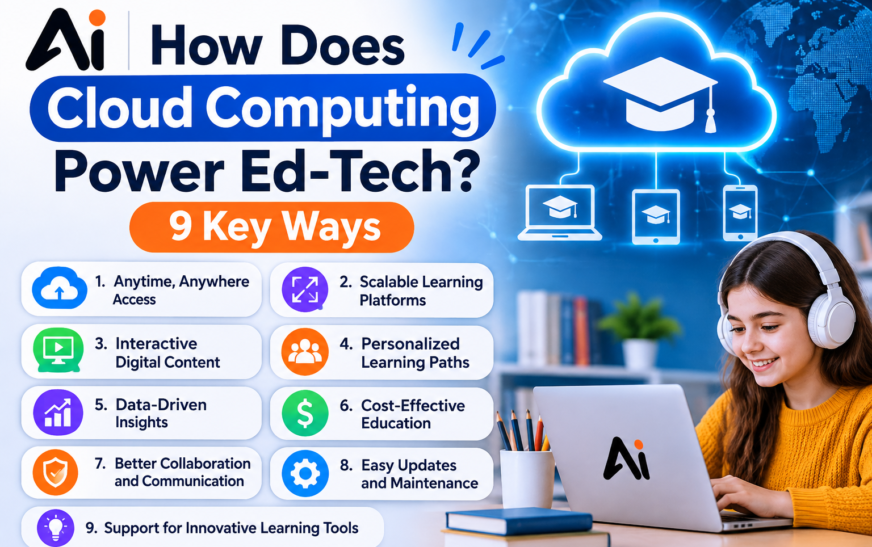
How Does Cloud Computing Power Ed-Tech? 9 Core Ways
1. Running Cloud-Based Learning Management Systems (LMS)
The learning management system is the digital hub of modern education. It is where teachers post lessons, students submit assignments, and grades get recorded. Cloud-based LMS platforms like Canvas, Moodle and Google Classroom run entirely online. Schools don’t install software, apply patches or worry about server failures. The provider handles all of it, and new features roll out automatically.
2. Supporting Virtual Classrooms and Remote Learning
Live video lessons, breakout rooms, screen sharing and digital whiteboards all require serious bandwidth and processing power. Cloud platforms supply that power so a teacher in one city can teach students spread across a state, or even a continent. When schools shifted to remote learning during the pandemic, cloud-based tools were what made that switch possible almost overnight. Today the same infrastructure supports hybrid learning environments, where some students attend in person and others join online.
3. Making Online Learning Platforms Scalable
Scalability is one of the biggest reasons ed-tech companies use cloud computing. Usage in education is uneven. Traffic spikes at the start of a semester, during exam weeks, and right before assignment deadlines. With on-site servers, a school would need to buy enough hardware for the busiest day of the year, then let it sit idle the rest of the time.
Cloud infrastructure scales automatically. When thousands of students log in at once, extra computing resources spin up. When traffic drops, they shut down. Platforms stay fast and stable, and institutions pay only for what they use.
4. Storing and Delivering Digital Learning Resources
Lecture videos, e-books, slide decks, practice tests and interactive modules take up enormous storage space. Cloud storage keeps all of this content in one central place, accessible from any device.
Content delivery networks (CDNs) add another layer. A CDN copies content to servers located around the world, so a student in Texas and a student in Oregon both stream the same lecture from a server near them. That means faster loading, less buffering, and a smoother experience for learners on slower connections.
5. Enabling Real-Time Collaboration for Teachers and Students
Cloud-based collaborative learning tools let several people work on the same document, spreadsheet or presentation at the same time. A group of students can build a project together from their own homes, while the teacher watches progress and leaves comments in real time.
This kind of collaboration builds teamwork skills and mirrors how modern workplaces operate. It also eliminates the old problem of emailing file versions back and forth.
6. Powering AI Tutors and Adaptive Learning Technology
Artificial intelligence in education depends heavily on the cloud. AI tutors need large amounts of processing power to understand a student’s question, generate a helpful explanation and respond within seconds. Very few schools could run that kind of machine learning workload on their own hardware.
Adaptive learning technology also relies on the cloud. These systems track how each student performs, then adjust the difficulty, pace and type of content. A student who masters fractions quickly moves ahead, while one who struggles gets extra practice. This personalized learning is only practical at scale because cloud computing can process data for millions of learners at once.
7. Turning Student Data Into Learning Analytics
Every click, quiz score and login inside an ed-tech platform creates data. Cloud-based educational data analytics turns that raw information into useful insights. Teachers can see which students are falling behind, which topics confuse the whole class, and which resources students actually use.
School leaders can use student performance analytics to spot trends across classes or grade levels. Early warning systems built on this data can flag students at risk of failing before it is too late to help.
8. Hosting Virtual Labs and Simulations
Not every school can afford a fully equipped chemistry lab, an engineering workshop or high-end computers for 3D design. Cloud-hosted virtual labs and simulations close that gap. Students can run science experiments, test circuits or practice coding in a browser, with the demanding processing handled remotely.
This is especially valuable for online degree programs and under-resourced schools, giving students hands-on experience that would otherwise be out of reach.
9. Automating Grading With Cloud-Based Assessment Tools
Cloud-based assessment tools can deliver quizzes, randomize questions, grade multiple-choice and short-answer responses instantly, and record results directly in the gradebook. Some tools now use AI to give feedback on essays and coding assignments.
Automated grading saves teachers hours each week. Students also benefit from immediate feedback, which helps them correct mistakes while the material is still fresh.
Benefits of Cloud Computing in Education
Lower Education Technology Costs
Buying servers, licensing software, and paying staff to maintain everything is expensive. Cloud computing replaces large upfront costs with predictable subscription or pay-as-you-go pricing. Schools avoid hardware upgrades, reduce IT maintenance, and stop paying for capacity they don’t use.
Access to Learning From Any Device, Anywhere
Because everything lives online, students can learn from a school laptop, a home tablet or a phone. Work started in the classroom can be finished on the bus. This flexibility supports remote education, homeschooling, adult learners balancing jobs, and students who miss class due to illness.
Data Backup and Disaster Recovery
A broken hard drive, a flooded server room or a ransomware attack can wipe out years of school records. Major cloud providers store data across multiple locations and back it up automatically. If something goes wrong, data can be restored quickly, protecting lesson plans, grades and student records.
Faster Updates and Easy App Integration
Cloud software updates automatically, so schools always have the latest features and security patches. Cloud application integration also lets different tools connect with each other. An LMS can pull class rosters from the student information system, sync grades, and link to video and assessment apps, creating one connected ecosystem.
How Cloud Computing Helps Teachers and Students
For teachers, the cloud reduces administrative work. They can create a lesson once and reuse it every year, share resources with colleagues, grade faster, and track progress through dashboards instead of spreadsheets. That frees up more time for actual teaching and one-on-one support.
For students, the cloud means learning is always available. They can rewatch lectures before exams, collaborate on group projects without meeting in person, get personalized practice, and receive feedback quickly. Students who learn at a different pace benefit most from cloud-powered adaptive tools.
Examples of Cloud Computing in Education
Here are some well-known examples of cloud-based educational tools:
- Google Workspace for Education: Google Classroom, Docs, Drive and Meet for assignments, collaboration and video lessons.
- Microsoft 365 Education and Teams: Online classrooms, shared files and collaboration tools used by many schools and universities.
- Canvas and Moodle: Popular learning management systems that schools run in the cloud.
- Coursera and other online course platforms: Deliver online courses to large numbers of learners worldwide.
- Zoom: Widely used for virtual classrooms and remote lectures.
- AWS, Microsoft Azure and Google Cloud: The infrastructure many ed-tech companies build their platforms on.
Is Cloud Computing Safe for Student Information?
Data security and privacy are among the most common concerns schools have about the cloud. The good news is that major cloud providers invest heavily in security, often more than an individual school district ever could. Common protections include data encryption, multi-factor authentication, role-based access controls and continuous monitoring.
In the United States, two federal laws are especially important:
- FERPA (Family Educational Rights and Privacy Act) protects the privacy of student education records.
- COPPA (Children’s Online Privacy Protection Act) governs how online services collect personal information from children under 13.
Schools should choose vendors that comply with these laws, sign clear data privacy agreements, and explain exactly where student data is stored and who can access it. Strong passwords, staff training, and careful permission settings matter just as much as the provider’s own security.
Challenges of Cloud Computing in Education
Cloud computing is powerful, but it isn’t perfect. Schools should weigh these challenges:
- Internet access gaps: Cloud tools are only useful if students have reliable internet. The digital divide still leaves some rural and low-income students behind.
- Data privacy risks: Storing student data with third parties requires careful vetting, contracts and ongoing oversight.
- Vendor lock-in: Once a school builds its systems around one provider, switching can be difficult and costly.
- Service outages: When a cloud platform goes down, classes and assignments can be disrupted.
- Recurring costs: Subscriptions can add up over time, especially as more tools are added.
- Training needs: Teachers and staff need time and support to use cloud tools effectively.
The Future of Cloud-Powered Ed-Tech
Cloud computing will keep shaping the digital transformation in education. AI-powered tutors are becoming more capable and more common, and they rely on cloud processing to work at scale. Learning analytics will become more predictive, helping schools step in before students struggle. Immersive tools like virtual and augmented reality labs will grow as cloud and network speeds improve.
Hybrid learning is also here to stay. Many schools and universities now blend in-person teaching with online resources, and the cloud is what keeps those two worlds connected.
Frequently Asked Questions
What Does Cloud Computing in Education Mean?
Cloud computing in education means using internet-based servers to store, run, and deliver learning tools, content, and student data. Instead of relying on local computers or school servers, teachers and students access learning management systems (LMS), documents, and apps online from any device.
What Are the Benefits of Cloud Computing for Schools?
Schools save money on hardware and IT maintenance, scale tools as enrollment grows, and give students 24/7 access to learning materials. They also benefit from automatic updates, built-in data backups, and easier collaboration between staff and students.
How Does Cloud Computing Support E-Learning?
The cloud hosts e-learning platforms, video lessons, and course files so learners can stream and download them anytime. It handles traffic spikes during exams or live classes and syncs progress across devices, allowing students to switch from a laptop to a phone without losing their place.
Is Cloud Computing Safe for Student Information?
It can be safe when providers use encryption, multi-factor authentication, and strict access controls. Schools in the United States should choose vendors that comply with FERPA and COPPA where applicable, sign data privacy agreements, and clearly understand where student data is stored and who can access it.
How Does Cloud Computing Help Teachers?
Teachers can create, share, and grade assignments online, track student performance with analytics dashboards, and collaborate with colleagues in real time. Automated grading and ready-made digital resources reduce administrative work, leaving more time for teaching.
Can Cloud Computing Reduce Education Costs?
Yes. Pay-as-you-go cloud services reduce the need to buy and maintain expensive servers, and schools pay for the resources they use. However, subscription fees can add up over time, so institutions should compare long-term costs before committing to a provider.
What Are Examples of Cloud-Based Educational Tools?
Popular examples include Google Classroom, Microsoft Teams for Education, Canvas, Moodle, Coursera, and Zoom. Many ed-tech companies also use cloud providers such as AWS, Microsoft Azure, and Google Cloud to host their platforms and services.
How Does Cloud Computing Support AI Tutors?
AI tutors need significant computing power to understand questions, generate answers, and personalize lessons. The cloud provides this processing power on demand, allowing an AI tutor to serve many students simultaneously and adapt content to each learner’s level in real time.
What Are the Challenges of Cloud Computing in Education?
The main challenges include unreliable internet access in some communities, student data privacy concerns, dependence on a single vendor, occasional service outages, and recurring subscription costs. Schools also need staff training to use cloud-based tools effectively.
Conclusion
So, how does cloud computing power ed-tech? It provides the infrastructure, storage and processing power behind nearly every modern learning tool. The cloud runs learning management systems, keeps virtual classrooms online, scales platforms during peak demand, delivers digital content worldwide, and makes AI tutors and adaptive learning possible.
For schools, the payoff is lower costs, better access and stronger data protection. For teachers, it means less admin and more teaching. For students, it means learning that follows them wherever they go. Challenges like privacy, internet access and vendor lock-in are real, but with smart planning, cloud computing remains one of the most important forces shaping the future of education.