
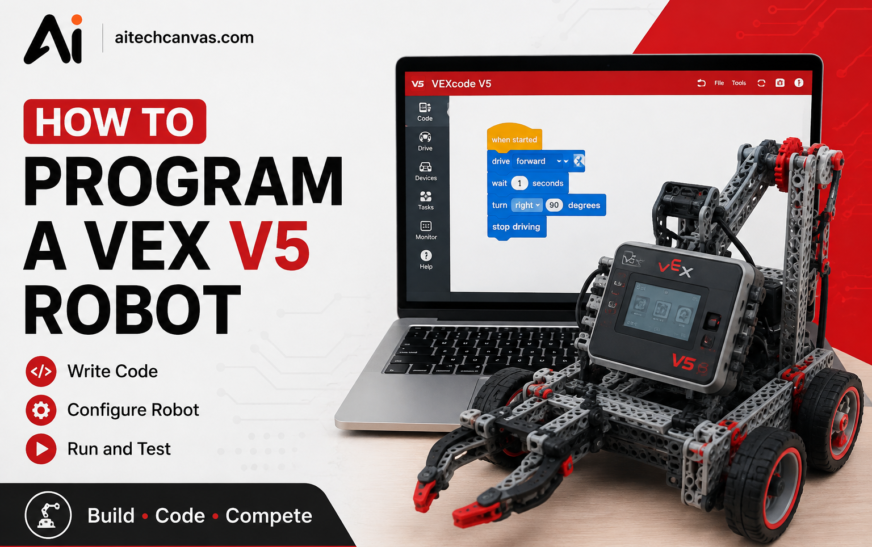
Program a VEX V5 robot and watch your code come alive instantly spin motors, navigate mazes, or conquer sensor challenges in real-time, turning abstract logic into tangible robot action. Learning How to Program a VEX V5 Robot is an excellent way to understand robotics, coding, automation, motors, sensors, and autonomous systems. The VEX V5 platform is designed to give students, educators, hobbyists, and robotics teams a practical environment where software and hardware work together.
Instead of simply writing code on a computer, VEX V5 programming lets you see the immediate result of your commands on a physical robot. A simple program can make a motor spin, move a drivetrain, respond to a sensor, or perform an autonomous sequence.
This guide explains the complete VEX V5 programming process, from installing VEXcode V5 and configuring your robot to programming motors, sensors, autonomous routines, and driver control.
How to Program a VEX V5 Robot? Start by installing VEXcode V5, connecting your V5 Brain to a computer, configuring the robot’s devices, and creating a program using Blocks, C++, or Python. You can then download the program to the V5 Brain, run it, test the robot, and make adjustments based on its behavior.
Beginners should usually start with simple commands such as moving motors forward or backward before progressing to drivetrain control, sensors, autonomous routines, and more advanced robotics projects.
Key Takeaways
- VEXcode V5 is the main programming environment for VEX V5 projects.
- Beginners can start with graphical Blocks programming.
- C++ and Python provide text-based programming options.
- Motors control movement and mechanical functions.
- Drivetrains combine motors to move and turn the robot.
- Sensors allow the robot to detect and respond to conditions around it.
- Autonomous programming allows the robot to operate without continuous driver input.
- Driver-control programming allows users to operate the robot through the V5 Controller.
- Testing and troubleshooting are essential parts of successful VEX V5 coding.
- Small projects are one of the easiest ways to develop VEX V5 programming skills.
What Is VEX V5 Robot Programming?
VEX V5 robot programming is the process of creating instructions that tell a VEX V5 robot what to do. These instructions are written in a programming environment and then transferred to the V5 Brain, which executes the commands.A robot does not automatically know how to move, turn, pick up objects, or respond to its surroundings. Programmers provide those instructions through code.
For example, a basic program might tell two drive motors to rotate forward for a specific amount of time. A more advanced program might use sensors to determine whether an object is nearby and then change the robot’s behavior. VEX V5 robot programming connects several important components:
- V5 Brain
- Smart Motors
- V5 Controller
- Sensors
- Drivetrain
- Programming software
The combination of these components makes VEX V5 coding useful for learning both programming and robotics. For beginners, the most important concept is that code provides instructions while the V5 Brain manages communication between the software and connected hardware.
What Software Do You Need to Program a VEX V5 Robot?
To create programs for a VEX V5 robot, you need compatible VEX programming software. VEXcode V5 is designed specifically for the VEX V5 platform and provides tools for creating and downloading robot programs.
Before starting, you generally need:
- A VEX V5 Brain
- A VEX V5 robot
- Compatible motors and sensors
- A computer
- A suitable USB connection or supported connection method
- VEXcode V5
VEXcode provides an environment where you can create projects, configure devices, write commands, and transfer programs to the V5 Brain.
How to Download VEXcode V5
Download and install the appropriate version of VEXcode V5 for your computer. After installation, open the software and create a new V5 project. The exact interface can vary between software versions, so beginners should use the current VEX documentation when installing or updating the software. Once the software is ready, connect the V5 Brain and make sure the computer recognizes the device.
How Does VEXcode V5 Work?
VEXcode V5 is the programming environment used to develop VEX V5 robot projects. It allows users to configure devices and create instructions that the V5 Brain can execute.
The basic workflow is straightforward:
Create project → Configure devices → Write code → Download → Test → Improve
When you create a project, you can select the programming method you want to use. Beginners often find graphical Blocks easier because commands can be assembled visually. More experienced programmers can use text-based languages such as C++ or Python where supported by the VEXcode V5 environment.
How to Use VEXcode V5
Start by creating a new V5 project. Next, configure the motors, drivetrain, sensors, and controller connected to your robot. After configuration, you can place programming commands into your project.
For example, you might create a simple sequence that:
- Starts a motor.
- Runs the motor forward.
- Waits for a specific amount of time.
- Stops the motor.
After creating the program, connect the V5 Brain and download the project. This process makes VEXcode V5 programming accessible even for people who have little previous coding experience.
How to Set Up Your VEX V5 Robot for Programming
Before writing code, the Robotics should be physically and electronically prepared. First, check that the V5 Brain is powered on. Then inspect the Smart Cables connecting the motors and sensors. Make sure the cables are securely connected and that the devices are connected to the ports you intend to use. Next, connect the V5 Brain to your computer.
Open VEXcode V5 and configure the devices in your project. The software needs to know which motors and sensors are connected and how they should be identified in the program. For example, you might configure:
- Left Drive Motor
- Right Drive Motor
- Intake Motor
- Distance Sensor
- Controller
Correct configuration is important because your program needs to know which physical device each command controls. A programming problem can sometimes be caused by incorrect device configuration rather than incorrect code.
How to Program a VEX V5 Robot Step by Step
The best way to learn VEX V5 programming is to follow a simple process and gradually increase the complexity of your projects.
Step 1: Create a New Project
Open VEXcode V5 and create a new project. Select the appropriate programming environment and give the project a useful name.
Step 2: Configure the Robot
Add the motors, drivetrain, sensors, and controller that are physically connected to the V5 Brain. Make sure the port numbers match the actual hardware.
Step 3: Add Your First Commands
Start with a simple command. For example, instruct a motor to spin forward. Avoid creating a complicated program immediately. A small program makes it easier to determine whether the hardware and software are working correctly.
Step 4: Download the Program
Connect the V5 Brain to the computer and download the project. The program is transferred from the computer to the Brain, where it can be selected and executed.
Step 5: Test the Robot
Place the robot in a safe area before running the program. Observe its movement and compare the result with your intended behavior.
Modify the Program
If the robot moves too quickly, turns incorrectly, or stops at the wrong time, modify the relevant commands. This test-and-improve process is one of the most important parts of robotics programming.
How to Program VEX V5 Motors
Motors are among the most important components in a VEX V5 robot. They convert programming instructions into physical movement. VEX V5 motor programming can control direction, speed, duration, and stopping behavior. A simple motor program might tell a motor to rotate forward at a certain speed.
You can use motor commands for:
- Wheels
- Intake systems
- Lifts
- Arms
- Rollers
- Other mechanical mechanisms
VEX V5 Motor Commands
The exact commands depend on the programming language and configuration, but common motor actions include:
- Spin forward
- Spin reverse
- Stop
- Set velocity
- Rotate for a specified amount
- Run continuously
The important concept is that different motors can perform different mechanical functions.
How to Make a VEX V5 Robot Move
A basic mobile robot usually needs multiple drive motors. When the motors on both sides rotate in the appropriate direction, the robot can move forward or backward, making this a fundamental concept in robotics automation and VEX V5 robot programming.
If one side rotates differently from the other, the robot can turn.
For example:
- Both sides forward → Robot moves forward
- Both sides backward → Robot moves backward
- Left side forward + right side slower → Robot turns
- The exact behavior depends on the drivetrain design and motor configuration.
How to Program the VEX V5 Drivetrain
The drivetrain is responsible for moving the robot around the field. A typical drivetrain includes wheels, motors, and mechanical components that transfer motor power to the wheels.
What Is VEX V5 Drivetrain Programming?
VEX V5 drivetrain programming involves creating instructions that control forward movement, reverse movement, turning, speed, and other driving behaviors. Instead of individually controlling every motor, a configured drivetrain can make movement easier to program.
How to Program a VEX V5 Drivetrain
First, configure the drive motors in VEXcode V5. Then define the drivetrain according to your robot design.
You can create commands that tell the robot to:
- Drive forward
- Drive backward
- Turn left
- Turn right
- Drive for a specific distance
- Turn for a specific amount
VEX V5 Drivetrain Code
Drivetrain code becomes more useful when combined with sensors. For example, a robot can drive toward a target and use a sensor to determine when it has reached a certain distance. This combination of movement commands and sensor feedback is an important step toward advanced robotics.
How to Program VEX V5 Sensors
Sensors give the robot information about its environment or its own movement. Without sensors, many robots rely entirely on predetermined commands. Sensors can make programs more responsive because the robot can make decisions based on detected conditions.
What Is VEX V5 Sensor Programming?
VEX V5 sensor programming involves reading information from connected sensors and using that information in the program.
Depending on the sensor, a robot may detect things such as:
- Distance
- Rotation
- Objects
- Color
- Temperature
- Position or movement
The available behavior depends on the specific VEX device being used.
How to Use Sensors in VEX V5 Programming
A basic sensor-based program can follow this logic:
- Read sensor → Check condition → Perform action
For example, if a distance sensor detects that an object is close, the robot could stop its drivetrain. Another program could use a sensor to detect a colored object and then activate an intake mechanism.
VEX V5 Sensor Code
Sensor code becomes especially powerful when used with conditional statements.
For example:
- If condition is true → perform action
- Otherwise → continue or perform another action
- This allows robots to react rather than simply follow a fixed sequence.
How to Program Autonomous Mode
Autonomous programming is an important part of competitive robotics. In autonomous mode, the robot performs programmed actions without continuous manual control from the driver.
What Is VEX V5 Autonomous Programming?
VEX V5 autonomous programming creates a sequence of commands that the robot executes automatically.
An autonomous routine might include:
- Move forward.
- Turn.
- Activate an intake.
- Detect an object.
- Move toward another location.
- Stop.
The robot follows the instructions stored in the program.
How to Program VEX V5 Autonomous
- Start with a short sequence rather than trying to create a complete competition routine immediately.
- For example, program the robot to move forward, stop, turn, and stop again.
- Test each action individually.
- Then combine the commands into a larger routine.
Timing and movement accuracy are important. Small mechanical differences, battery conditions, wheel traction, and field conditions can affect the robot’s actual movement.
VEX V5 Autonomous Code Example
A simple autonomous concept can look like this:
- Start → Drive Forward → Stop → Turn → Stop
A more advanced example might be:
- Start → Drive Forward → Activate Mechanism → Reverse → Turn → Drive to Target → Stop
The exact code depends on the robot’s hardware and the selected programming language.
How to Program Driver Control
Driver control allows a person to operate the robot using the V5 Controller. Instead of following a fixed autonomous routine, the robot receives commands based on controller input.
How to Program a VEX V5 Controller
First, configure the V5 Controller in the project. Then assign controller buttons, joysticks, or other inputs to robot functions.
For example:
- Left joystick → Drive
- Right joystick → Turning
- Button A → Intake
- Button B → Reverse intake
- Another button → Lift
The exact controller layout can be customized according to the robot and driver’s preferences.
VEX V5 Controller Code Basics
A driver-control program usually runs continuously while the robot is being operated. The program checks controller inputs and sends the appropriate commands to motors or other devices. Good controller programming should make the robot predictable and easy to operate.
VEX V5 Blocks vs C++ vs Python
One of the most common questions for new programmers is which programming language they should use. VEX V5 supports different programming approaches through its programming environment, including graphical Blocks and text-based options such as C++ and Python.
VEX V5 Blocks Programming
Blocks programming uses visual programming blocks that can be connected together. It is particularly useful for beginners because the visual structure can make programming concepts easier to understand.
Blocks can help students learn:
- Sequences
- Loops
- Variables
- Conditions
- Motor commands
- Sensor logic
VEX V5 C++ Programming
C++ is a text-based programming language commonly used in robotics and embedded systems. VEX V5 C++ programming can provide greater flexibility for programmers who are comfortable working with syntax, functions, variables, conditions, and more complex program structures. Beginners may find C++ more challenging than Blocks, but learning it can help develop transferable programming skills.
VEX V5 Python Programming
Python is another text-based programming option available in VEX’s programming ecosystem. Its readable syntax makes Python popular among beginners and experienced programmers. Python can be useful for learning programming concepts while working with a physical robot.
What Is the Best Programming Language for VEX V5?
There is no single best language for every user. Blocks can be a good starting point for beginners. Python can provide an accessible transition into text-based programming, while C++ can be valuable for programmers who want to work with a widely used systems and robotics language. The best option depends on your experience, project requirements, and learning goals.
How to Upload Code to the VEX V5 Brain
After creating a program, you need to transfer it to the V5 Brain. Connect the Brain to your computer and make sure VEXcode V5 recognizes it. Select the appropriate project and use the software’s download or program controls to transfer the code. Once the program has been downloaded, you can disconnect the computer if appropriate and run the project directly from the V5 Brain.
How to Program VEX V5 Brain
The V5 Brain acts as the central control unit for the robot. Your program provides instructions, while the Brain communicates with connected motors, sensors, and other devices. If a program does not behave correctly, check both the code and the hardware configuration.
Make sure:
- The correct project is selected.
- The correct devices are configured.
- Port numbers match the hardware.
- Cables are connected properly.
- The Brain has sufficient power.
- The downloaded program is the version you intended to test.
Common VEX V5 Programming Problems and Fixes
Even simple robotics projects can produce unexpected results. Troubleshooting is therefore an important part of learning.
Why Is My VEX V5 Code Not Working?
Start by checking the code structure and device configuration. Look for incorrect commands, missing steps, incorrect conditions, or improperly configured devices. Test one part of the program at a time instead of running a large program immediately.
Why Is My VEX V5 Robot Not Moving?
If the robot does not move, check:
- Motor connections
- Motor configuration
- Battery level
- Drivetrain setup
- Program selection
- Motor commands
- V5 Brain status
A physical wiring issue can look like a software problem, so inspect both areas.
How to Fix VEX V5 Code Upload Problems
- Check the connection between the computer and V5 Brain.
- Restarting the software or reconnecting the Brain can sometimes help with connection-related issues.
- Also make sure you are using compatible and updated software and firmware.
Why Is My VEX V5 Motor Not Responding?
Verify that the motor is connected to the correct port and configured under the expected device name. Then test the motor independently. If other motors work but one motor does not, inspect its cable, port, configuration, and physical condition.
How to Solve VEX V5 Brain Programming Problems
If the Brain does not behave as expected, check whether the correct program was downloaded and whether the configured devices match the robot. Reading error messages carefully can also help identify the source of a problem.
How to Fix VEX V5 Connection Problems
Connection problems can result from cables, ports, software, firmware, or device recognition. Try reconnecting the devices and checking whether the Brain appears correctly in VEXcode V5.
Common VEX V5 Programming Errors
Common beginner mistakes include:
- Wrong motor direction
- Incorrect port numbers
- Missing device configuration
- Incorrect speed settings
- Incorrect sensor conditions
- Timing problems
- Forgetting to stop a motor
- Using the wrong project
VEXcode V5 Troubleshooting Tips
The best troubleshooting strategy is to simplify the problem. Instead of testing an entire robot program, test individual components. For example, first test the motor, then the drivetrain, then the sensor, and finally the complete autonomous routine.
Best Tips for Learning VEX V5 Programming
Learning robotics programming becomes easier when you build your skills gradually.
Easy VEX V5 Programming Tips
Start with simple projects.
A beginner could create programs for:
- Moving forward
- Moving backward
- Turning
- Controlling an intake
- Reading a sensor
- Operating a controller
Once these concepts are understood, combine them.
How to Practice VEX V5 Coding
- Practice one programming concept at a time.
- For example, spend one project learning loops and another learning conditional statements.
- Then combine those concepts with motors and sensors.
How to Write Better VEX V5 Robot Programs
- Keep your programs organized.
- Use meaningful device names, separate different functions logically, and avoid unnecessary complexity.
- Testing frequently is also important.
- Rather than writing hundreds of lines of code and testing everything at once, write a small section, test it, and then continue.
How to Improve Your VEX V5 Robot Programming Skills
After learning the basics, you can start working on more advanced projects.
Start With Simple Robot Movements
Learn how motors and drivetrains work before creating complex autonomous routines. Understanding basic movement makes it easier to diagnose problems later.
Practice With Motors and Sensors
Combine motor commands with sensor input. For example, create a program that makes the robot drive until a sensor detects an object. This introduces the idea of feedback-based robotics.
Build Autonomous Programs
Create short autonomous routines and test them repeatedly. Focus on accuracy rather than simply making the robot complete a task once.
Learn From Programming Errors
Errors are part of the programming process. Instead of viewing an error as a failure, use it to understand how the software and robot hardware interact.
Move From Blocks to Text-Based Programming
Once you are comfortable with graphical programming, try Python or C++. The transition can help you understand more advanced programming concepts and prepare you for larger robotics projects.
Conclusion
How to Program a VEX V5 Robot becomes much easier when you approach the process step by step. Begin with VEXcode V5, configure your hardware correctly, and learn basic motor commands before moving into drivetrain, sensor, autonomous, and controller programming.
Beginners do not need to master every programming concept immediately. A simple project that makes a motor move can provide the foundation for a much more advanced robot. As your skills develop, you can combine sensors, motors, conditional logic, loops, autonomous routines, and controller input to create increasingly capable robotic systems.
The most effective way to improve is through practical experimentation. Build a small program, test it, identify what went wrong, make an adjustment, and test again. This cycle helps you understand both coding and robotics. Whether you choose Blocks, Python, or C++, consistent practice can help you develop useful programming skills while learning how robots sense, decide, and act.
FAQs
What Is the Easiest Way to Program a VEX V5 Robot?
For beginners, graphical Blocks programming can be an accessible way to learn the fundamentals. It allows users to create programs visually before moving to text-based programming.
Can Beginners Program a VEX V5 Robot?
Yes. VEX V5 is widely used as an educational robotics platform, and beginners can start with basic motor and movement programs before learning more advanced concepts.
Can You Program VEX V5 With Python?
Python is available as a programming option within the VEX programming ecosystem. Availability and specific features can depend on the current VEXcode version and platform support.
Can You Program VEX V5 With C++?
Yes. C++ is a text-based programming option used with VEX V5 programming. It can be useful for users who want to develop more advanced programming skills.
Is VEXcode V5 Free to Use?
VEXcode is provided by VEX for programming compatible VEX robotics platforms. Users should check the current official VEX software information for the latest availability and supported platforms.
How Do I Upload Code to the VEX V5 Brain?
Connect the V5 Brain to your computer, open the project in VEXcode V5, make sure the robot devices are configured correctly, and use the software’s download controls to transfer the program to the Brain.
Why Is My VEX V5 Robot Not Moving?
Check the motor connections, battery, device configuration, drivetrain setup, motor commands, and selected program. A physical connection issue can also prevent the robot from moving.
What Is the Best Programming Language for VEX V5?
The best language depends on your experience. Blocks can be easier for beginners, while Python and C++ can help users develop text-based programming skills and work with more complex projects.
How Can I Learn VEX V5 Programming Faster?
Start with small projects, practice motors and sensors separately, learn one programming concept at a time, and test your code frequently.