
Amazon sellers need an efficient way to manage orders, invoices, payments, and accounting records. As an e-commerce business grows, creating invoices manually can take valuable time and increase the risk of errors. This is where Amazon FBA vs FBM invoice automation becomes important.
Fulfillment by Amazon (FBA) and Fulfillment by Merchant (FBM) are two popular fulfillment methods for Amazon sellers. Both models require accurate financial records, but their invoicing workflows and operational responsibilities can differ.
By using invoice automation software, sellers can simplify invoice generation, organize financial documents, and connect order data with compatible accounting applications. In this guide, we explain how Amazon FBA and FBM invoice automation works, compare their differences, and explore ways to improve invoice processing.
What Is Amazon FBA vs FBM Invoice Automation?
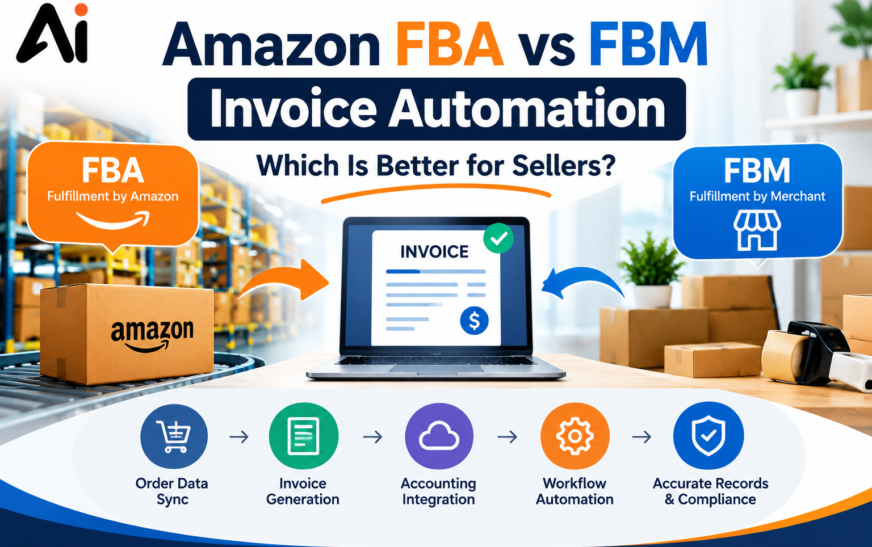
Amazon FBA vs FBM invoice automation refers to using software and automated workflows to simplify invoice-related tasks for sellers who use Fulfillment by Amazon or Fulfillment by Merchant.
Depending on the software and available integrations, invoice automation can help sellers:
- Collect order information from supported sources.
- Generate invoices using predefined templates.
- Organize invoice documents and transaction records.
- Connect invoicing systems with accounting software.
- Reduce repetitive data entry.
- Improve invoice tracking and financial reporting.
The main purpose of invoice automation is to make invoicing more consistent and efficient while reducing manual work.
What Is Amazon FBA?
Fulfillment by Amazon is a service in which sellers send eligible inventory to Amazon fulfillment centers. Amazon manages storage, packing, shipping, and certain customer service and returns activities.
However, sellers still need to manage their business finances and understand their invoicing responsibilities. Using FBA does not automatically mean that every invoice requirement is handled by Amazon.
FBA sellers can benefit from automation that organizes marketplace order information, supports invoice creation, and synchronizes eligible financial data with accounting applications.
What Is Amazon FBM?
Fulfillment by Merchant is a fulfillment method in which sellers manage storage, packing, and shipping themselves or through a third-party fulfillment provider.
FBM sellers may need to coordinate their invoicing processes with their own inventory, order management, shipping, and accounting systems.
Invoice automation can help these sellers prepare invoice documents, organize order records, and reduce repetitive administrative tasks as their businesses grow.
How Amazon FBA Invoice Automation Works
Amazon FBA invoice automation helps sellers streamline the administrative tasks associated with orders fulfilled by Amazon.
A typical workflow may include the following steps.
1. Collect Amazon Order Data
The automation system retrieves or imports eligible order information through a supported integration. Depending on the available data, this may include order identifiers, product details, quantities, prices, and relevant transaction information.
2. Generate Invoice Documents
The invoicing application uses the available order information to create an invoice based on the seller’s configured template and business rules.
3. Check Invoice Accuracy
Before an invoice is finalized, the workflow should verify required fields, invoice numbering, currency, and applicable tax information.
4. Deliver or Make Invoices Available
The software can support invoice delivery or document availability through the methods it offers. Sellers should confirm that the process meets the requirements of the relevant marketplace and jurisdiction.
5. Synchronize Accounting Records
Compatible applications can transfer supported invoice or transaction data into accounting software, reducing duplicate data entry.
Benefits of FBA Invoice Automation
- Reduces repetitive invoice preparation.
- Helps maintain consistent invoice formats.
- Improves organization of order and financial records.
- Supports accounting workflow automation.
- Helps businesses handle increasing order volumes.
- Can reduce manual data-entry errors.
The exact benefits depend on the software, integration capabilities, and the seller’s existing workflow.
How Amazon FBM Invoice Automation Works
Amazon FBM invoice automation focuses on streamlining invoicing for orders fulfilled by the seller.
Because the seller manages fulfillment activities, the invoicing workflow may need to coordinate with shipping software, inventory systems, order management applications, and bookkeeping tools.
A typical FBM invoice automation workflow includes:
- Importing or recording the Amazon order details.
- Checking product information, quantities, prices, and applicable taxes.
- Generating the required invoice document.
- Connecting the invoice with the correct order and shipment records.
- Delivering or making the invoice available through the appropriate process.
- Saving invoice records for accounting and reporting.
Benefits of FBM Invoice Automation
- Simplifies seller-managed invoicing.
- Reduces repetitive administrative work.
- Connects invoices with order processing.
- Helps maintain consistent documentation.
- Improves visibility into sales transactions.
- Supports business growth and scalable workflows.
For sellers who fulfill orders through multiple sales channels, compatible automation software can also help organize invoices from different platforms in one system.
Amazon FBA vs FBM Invoice Automation: Key Differences
Although both fulfillment methods can benefit from invoice automation, their operational requirements differ.
| Feature | Amazon FBA | Amazon FBM |
| Order fulfillment | Amazon handles fulfillment activities | Seller or fulfillment provider handles fulfillment |
| Order data | Uses available marketplace order information | Uses marketplace data and seller-managed systems |
| Shipping coordination | Relies on available Amazon fulfillment information | May connect directly with seller shipping workflows |
| Inventory management | Inventory is stored at Amazon fulfillment centers | Inventory is managed by the seller or provider |
| Invoice automation | Can automate supported order and invoice workflows | Can coordinate invoicing with seller-managed processes |
| Accounting integration | Can synchronize supported financial data | Can synchronize supported order and financial data |
| Main consideration | Confirm integration and invoicing capabilities | Confirm compatibility with shipping and order systems |
Neither FBA nor FBM is automatically better for invoice automation. The right option depends on the seller’s business model, operational requirements, order volume, available integrations, and budget.
Best Invoice Automation Software for Amazon Sellers
Choosing the right invoice automation software can help Amazon sellers reduce manual work and improve their financial recordkeeping.
Before selecting a solution, consider the following features.
1. Amazon Integration
Look for software that supports your Amazon marketplace and provides access to the order information required for invoicing.
Verify which integrations are available, what permissions they require, and whether they support your specific workflow.
2. Automatic Invoice Generation
The software should support invoice templates, appropriate numbering, currency settings, and required business and tax fields.
Automatic invoice generation can help reduce repetitive work, but sellers should still check invoice accuracy.
3. Accounting Software Integration
Accounting integrations can transfer supported invoice and transaction details into bookkeeping applications.
This helps reduce duplicate data entry and makes it easier to organize business financial records.
4. Tax and Compliance Features
Invoice requirements vary by country, marketplace, and transaction type. Check whether the software supports the tax fields, invoice formats, credit notes, and recordkeeping requirements relevant to your business.
5. Reporting and Reconciliation
Reporting features can help sellers review orders, invoices, refunds, fees, and payments.
It is important to distinguish customer invoices from Amazon settlement reports because they serve different purposes.
6. Pricing and Scalability
Compare subscription fees, transaction limits, supported marketplaces, integration costs, and user limits.
A small seller may need only basic invoicing, while a larger operation may benefit from advanced automation, reporting, and multi-channel integrations.
Automate Amazon Invoices With Zapier, Make, and Invoice Ninja
Amazon sellers can use workflow automation tools such as Zapier and Make to connect supported applications and streamline invoice-related tasks. When combined with a compatible invoicing system such as Invoice Ninja, these workflows may help organize order details, create invoice records, and reduce repetitive data entry.
A typical workflow can collect supported order information, check whether an invoice already exists, create an invoice when appropriate, and save the resulting record for accounting. The exact steps depend on the available integrations and the configuration of each application.
For a practical example, read our guide on Zapier, Make, and Amazon Invoice Ninja automation. It complements this article by exploring how automation tools can work together to simplify invoice management.
How to Automate Amazon Invoices Using Zapier and Make
Zapier and Make are workflow automation platforms that connect supported applications and coordinate tasks between them.
Depending on the available connectors, sellers may be able to use these tools to automate parts of their invoice processing workflow.
A possible automation process looks like this:
- Trigger: A supported application detects a new order or receives an order update.
- Retrieve data: The workflow collects the required order information.
- Check existing records: The automation searches for an invoice or processing record associated with the order.
- Generate the invoice: If no existing invoice is found and the order meets the configured conditions, a compatible invoicing application creates the document.
- Store the record: The invoice or its reference is saved in an approved system.
- Update accounting: Supported invoice and transaction information is transferred to the accounting application.
- Send a notification: The workflow reports successful processing or flags an error for review.
Not every Amazon account or connected application supports every trigger or action. Check connector availability, API permissions, data fields, and the requirements of your invoicing software before building the workflow.
How to Avoid Duplicate Invoices in Zapier and Make
Duplicate invoices can create accounting errors, confuse customers, and make financial reconciliation more difficult. These problems can occur when an automation runs more than once, an application retries a failed task, or an order is imported through multiple workflows.
To reduce duplicate invoice creation, Amazon sellers should use a reliable duplicate-prevention process.
Important practices include:
- Use a unique order identifier to identify the transaction.
- Search existing invoice records before generating a new document.
- Store the invoice status after successful processing.
- Configure retry handling carefully.
- Use consistent rules across connected automation workflows.
- Review failed runs and monitor duplicate records.
For a more detailed explanation, read our guide on how to avoid duplicate invoices in Zapier and Make. It covers duplicate prevention and ways to improve invoice automation workflows.
This internal link provides readers with a more focused resource on one of the most important challenges in automated invoicing.
Common Amazon Invoice Automation Mistakes to Avoid
Automation can improve efficiency, but a poorly configured workflow can create new problems.
Using Incomplete Order Data
Ensure the workflow has access to all the information required to generate an accurate invoice. Missing product, customer, or tax details may require manual review.
Creating Duplicate Invoices
Always check whether an invoice already exists before creating another one. Unique order identifiers and reliable processing records can help prevent duplicate documents.
Ignoring Refunds and Cancellations
Create procedures for handling cancellations, refunds, invoice corrections, and credit notes where required. The correct process depends on the transaction and applicable rules.
Confusing Invoices With Amazon Payouts
Customer invoices, Amazon fees, settlement reports, and bank deposits represent different financial records. Keep them properly organized to improve reconciliation.
Assuming Tax Compliance Is Automatic
Software can apply configured tax rules, but sellers should verify the requirements that apply to their business and confirm that the software supports them.
Failing to Monitor Automation
Regularly review failed runs, missing documents, synchronization issues, and unexpected invoice records. Monitoring helps identify problems before they affect a large number of transactions.
Is Amazon FBA or FBM Better for Invoice Automation?
The best fulfillment model depends on your business priorities.
Amazon FBA may suit sellers who prefer Amazon to handle fulfillment activities. FBM may suit sellers who want more direct control over inventory, packing, and shipping.
From an invoice automation perspective, FBA sellers may prioritize reliable access to marketplace order information and compatible integrations. FBM sellers may prioritize connecting invoices with their own shipping and order management systems.
Both models can benefit from automatic invoice generation, organized financial records, accounting synchronization, and duplicate prevention.
Before choosing a fulfillment model, compare the overall operating costs and verify that the invoicing process meets your business requirements.
Frequently Asked Questions
1. What is Amazon FBA invoice automation?
Amazon FBA invoice automation uses compatible software and workflows to streamline invoice creation, order data handling, document storage, and related accounting tasks for sellers using Fulfillment by Amazon.
2. Can Amazon FBM sellers automate invoices?
Yes. FBM sellers can use compatible invoicing software and integrations to generate invoice documents, organize order records, and connect invoice data with accounting applications.
3. Does Amazon automatically create every invoice for sellers?
Sellers should not assume that every invoice requirement is automatically handled by Amazon. Responsibilities depend on the transaction, marketplace rules, applicable law, and services provided.
4. Can Zapier or Make automate Amazon invoice processing?
Potentially. Zapier and Make can connect supported applications and coordinate invoice workflows. The exact capabilities depend on available integrations, triggers, actions, and permissions.
5. How can I prevent duplicate Amazon invoices?
Use unique order identifiers, check existing invoice records before creating new documents, store processing status, and monitor workflow retries. Read our guide on avoiding duplicate invoices in Zapier and Make for additional guidance.
6. What features should invoice automation software include?
Useful features include Amazon integration, invoice generation, accounting synchronization, tax-related fields, duplicate prevention, reporting, and error monitoring.
7. Does invoice automation guarantee tax compliance?
No. Automation can help maintain records and apply configured rules, but sellers must verify their invoicing processes against applicable legal and tax requirements.
8. Is invoice automation useful for small Amazon sellers?
Yes. Small sellers can benefit when manual invoicing becomes repetitive or when they need more consistent financial records. The software should be affordable and appropriate for their order volume.
Conclusion
Amazon FBA vs FBM invoice automation helps sellers simplify invoicing, organize financial records, and reduce repetitive administrative work.
FBA sellers can focus on marketplace data and supported integrations, while FBM sellers may need to coordinate invoicing with their own fulfillment and shipping systems. Both can benefit from reliable invoice generation, accounting integrations, and regular workflow monitoring.
If you use Zapier or Make, prioritize duplicate prevention and careful error handling. Our guide on how to avoid duplicate invoices in Zapier and Make provides additional information about reducing duplicate records.
Start by identifying the tasks that consume the most time, checking the integrations available to your business, and testing the workflow on a small number of orders. A well-configured invoice automation system can help you maintain more accurate records and manage your Amazon business efficiently.