
If you have ever used a rank tracker or SEO tool and suddenly hit a Google CAPTCHA out of nowhere, automated queries are probably the reason. Automated queries are search requests sent to Google by a script, bot, or program instead of a real person typing into the search box. Google restricts this because it puts unusual load on its systems and can be used to scrape results at scale. Understanding what counts as an automated query helps you use SEO tools safely without getting flagged.
What Automated Queries Actually Are
An automated query is any search sent to Google’s servers through code rather than manual typing. This includes rank-tracking scripts, scraping tools, browser automation, and custom programs built to pull search results repeatedly. Google’s Terms of Service specifically prohibit sending automated queries of any sort to its system without express permission.
The key difference is intent and method. A person searching “best pizza near me” ten times a day is normal behavior. A script sending the same query pattern hundreds of times a minute, from the same IP address, is not. Google’s systems are built to spot that pattern and respond to it. You can read Google’s own wording on this in its Search Help documentation on automated queries.
Who This Affects
This topic mostly matters to two kinds of people: SEO professionals who rely on rank-tracking software, and developers building tools that touch search data. If you run an agency and use software to check where client websites rank for target keywords, you are relying on automated queries every day, whether you realize it or not. It also matters to anyone building a scraper, a price comparison tool, or a research script that pulls data from Google Search results pages directly. Even a well-intentioned personal project can trip the same detection systems that catch large-scale scrapers.
What Readers Are Trying to Find Out
Most people searching this term want one of three things: a plain definition of the term, an explanation of why Google blocks these queries, or a way to fix a CAPTCHA or “unusual traffic” warning they just ran into. This guide covers all three so you are not left guessing after reading it.
How Google Detects and Responds to Automated Queries
Google watches for patterns that a human search session would not produce. Sending searches too fast, repeating similar queries from one IP, missing normal browser signals, or hitting search endpoints directly instead of through google.com are all common triggers.
When Google’s system suspects automated activity, it usually responds with a CAPTCHA challenge first. If the pattern continues, Google can temporarily block that IP address from search results for a period of time. I ran into this myself a few years ago while testing a basic rank-checking script for a client site. Within an hour of running it every few seconds, my home IP got hit with a CAPTCHA wall on regular Google searches, which was a clear reminder that even small-scale automation gets noticed fast.
This is one reason legitimate SEO tools do not just hit Google Search directly. They route requests through the official Google Search Console API, licensed data partners, or infrastructure specifically built and permitted for large-scale querying.
Practical Tips for Working Around This Safely
- Use Google Search Console for your own site’s ranking and click data instead of scraping SERPs yourself.
- If you need broader keyword or SERP data, use an established SEO data provider (like Semrush, Ahrefs, or DataForSEO) rather than writing your own scraper.
- If you must automate anything search-related, add delays between requests and avoid hammering the same query repeatedly.
- Never route automated scripts through Google’s public search page in high volume; it’s the fastest way to get an IP flagged.
- If you get a CAPTCHA on your own browser after running a tool, stop the tool and wait a while before trying again.
Common Mistakes and Things to Know
A lot of people assume that using a “human-like” delay between requests is enough to avoid detection. It reduces the risk but does not eliminate it, since Google looks at more than just timing. Another common mistake is running rank-tracking software from a shared office network, which can get the entire office temporarily blocked from Google Search if the tool is aggressive.
It’s also worth knowing that being blocked for automated queries is not the same as a search penalty. It doesn’t affect how your website ranks. It only affects your ability to run more searches from that IP for a while, so there’s no lasting SEO harm to worry about if it happens. Automated queries are instructions that allow software, databases, search systems, and AI tools to retrieve or process information automatically. Instead of manually entering the same query repeatedly, a system can execute it based on a schedule, trigger, or predefined condition. Automated queries are commonly used for data retrieval, analysis, search, reporting, and business automation. With AI, users can also create queries using simple natural-language instructions.
What Are Automated Queries?
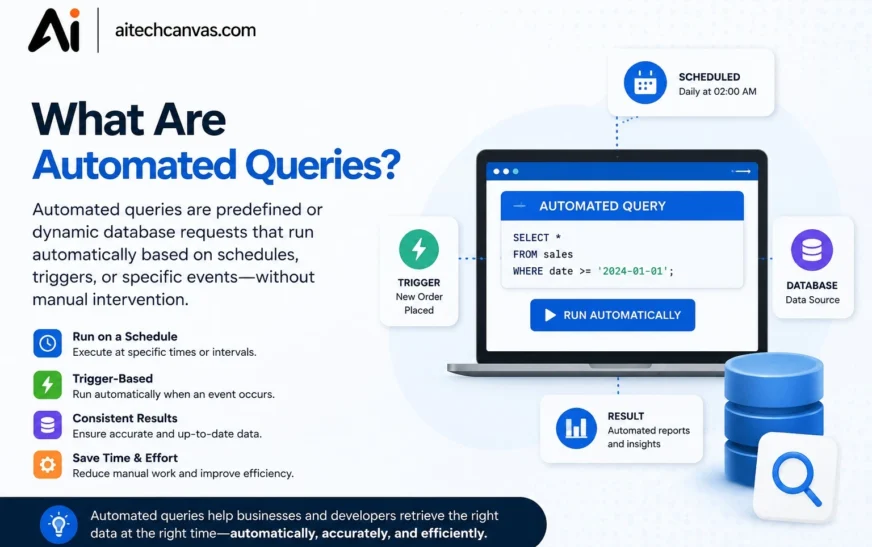
Automated queries are predefined requests that a computer system can execute without requiring a person to manually run the same task every time. They can search databases, retrieve information, filter records, or process data automatically. Query automation is especially useful when the same task needs to be performed repeatedly. It helps reduce manual work while making information retrieval faster and more consistent.
What Is an Automated Query?
An automated query is a request for information that runs automatically according to predefined instructions. It may be triggered by a schedule, a system event, a new record, or another condition. For example, a company can automatically query its sales database every morning. The results can then be sent to a dashboard, report, or another application.
What Are Automated Queries in AI?
Automated queries in AI use artificial intelligence to create, execute, analyze, or improve queries as part of an automated workflow. A user can describe what they need in natural language, and an AI tool may generate an appropriate query. AI can also analyze the retrieved information and summarize important findings. This makes data retrieval easier for people who may not know technical query languages.
What Is Query Automation?
Query Automation is the process of making queries run automatically using databases, scripts, APIs, AI tools, or automation platforms. Instead of manually executing a query every time, users define the task once and let the system handle repeated executions. Query automation can be used for searches, reports, monitoring, and data analysis. It is particularly useful for repetitive tasks that follow predictable rules.
What Is an Automated Search Query?
An automated search query is a search request that runs automatically according to predefined instructions. For example, a monitoring system can search for a company name or keyword every few hours. New results can then be collected, analyzed, or sent as notifications. Automated search is useful for research, brand monitoring, competitor tracking, and regularly changing information.
How Do Automated Queries Work?
Automated queries usually work by connecting a predefined query with a trigger and an action. The system waits for the trigger, executes the query, retrieves the required information, and processes the results. The final output can be displayed in a dashboard, stored in a database, or sent to another application. A typical workflow looks like Trigger → Query → Data Retrieval → Processing → Action.
How a Query Is Created Before Automation
The first step is to define exactly what information the system needs to retrieve. The query may include keywords, filters, conditions, date ranges, or specific database fields. For example, a query could request all orders created during the previous 24 hours. Testing the query manually before automation helps ensure that it returns the expected results.
How Automated Queries Are Triggered
Automated queries need a trigger that tells the system when to execute them. Common triggers include scheduled times, new database records, file uploads, API events, and changes in a system. A query could run every hour, once a day, or whenever a particular event occurs. The trigger depends on the purpose and requirements of the automation.
How Data Is Retrieved Automatically
After the trigger occurs, the system executes the query against the selected data source. This source could be a database, API, cloud application, spreadsheet, CRM, or analytics platform. The query retrieves only the information that matches the defined conditions. The results can then be passed to another step for processing or analysis.
How AI Processes Automated Query Results
AI can be added after an automated query retrieves information from a data source. Instead of simply displaying raw records, AI can summarize the results, identify patterns, or explain important changes. For example, an automated sales query can send its results to an AI system for a daily performance summary. This combines automated data retrieval with AI-powered analysis.
How Automated Query Workflows Run
In advanced systems, an automated query is often one part of a larger workflow. A new event can trigger a query, which retrieves data and sends it to an AI or reporting system. The processed information can then trigger another action, such as sending an email or updating a dashboard. This creates an end-to-end workflow with minimal manual involvement.
What Are Automated Queries Used For?
Automated queries are used whenever information needs to be searched, retrieved, analyzed, or monitored repeatedly. Businesses and individuals can use them with databases, search systems, APIs, and AI tools. They are particularly valuable for repetitive tasks that follow predictable rules. Common applications include automated search, data retrieval, reporting, database monitoring, and workflow automation.
Automated Search
Automated search allows a system to repeatedly search for specific keywords, topics, or information. A company could automatically search for new brand mentions, news articles, or competitor updates. This removes the need to perform the same search manually every day. Automated search can also be connected to alerts so users are notified when new results appear.
Automated Data Retrieval
Automated data retrieval allows systems to collect information from databases, APIs, applications, or other sources without manual intervention. For example, a business can retrieve new customer records every morning. The collected information can then be processed or transferred to another system. This saves time and keeps recurring datasets updated.
Data Analysis
Automated queries can collect data and send it directly to analytics systems. A company can automatically retrieve sales, website traffic, customer activity, or financial information for analysis. AI can also analyze the retrieved data and identify patterns or trends. This makes recurring data analysis faster and easier to manage.
Database Management
Automated queries are widely used for searching, filtering, updating, and monitoring databases. Database systems can automatically check for new records, missing information, or specific conditions. For example, an inventory query can identify products that have fallen below a certain stock level. The result can then trigger an alert or another business action.
Business Process Automation
Businesses can combine automated queries with other applications to create complete workflows. For example, a new customer record can trigger a query that retrieves customer details and updates a CRM system. Another action can then notify the sales team. This reduces repetitive administrative tasks and improves workflow efficiency.
Monitoring and Reporting
Automated queries can regularly collect information for dashboards and reports. A company may schedule queries to retrieve daily, weekly, or monthly performance data. The results can automatically update a report or business intelligence dashboard. This provides teams with more consistent access to current information.
Examples of Automated Queries
Automated queries can be used in simple searches as well as complex business workflows. They can retrieve information from databases, search systems, APIs, and cloud applications. The following examples show how query automation can work in real-world situations. Each example uses automation to reduce repetitive manual tasks.
Automated Search Query Example
A company can create an automated search query that looks for its brand name across relevant information sources. The search can run every few hours and identify new results. The system can then store the results or send notifications to the marketing team. This is useful for brand monitoring and competitive research.
Automated Database Query Example
An online store can automatically query its database every morning to find orders placed during the previous day. The results can be sent to a reporting system for daily sales analysis. Employees no longer need to manually run the same query each morning. This is a simple example of automated data retrieval.
Automated SQL Query Example
A business can use SQL automation to find customers who purchased more than a specific amount during a certain period. The SQL query can be scheduled to run every week. Results can then be sent to a marketing or analytics system. This allows teams to repeatedly access important customer information without manual execution.
Scheduled Query Example
A financial team may need a monthly report containing revenue, expenses, and transactions. Instead of manually running several queries at the end of every month, the queries can be scheduled. The system retrieves the required data automatically and sends it to a reporting platform. Scheduled queries are useful for recurring business reports.
Recurring Query Example
A website administrator can create a recurring query to check for pages returning errors. The query can run several times each day and identify newly detected problems. If an issue is found, the system can automatically send an alert. This allows technical teams to identify problems more quickly.
AI-Powered Query Example
A user could ask an AI tool to find the products with the highest sales during the current month. If the AI is connected to the relevant database, it may generate the required query automatically. The database returns the matching information, and the AI can explain the results. This demonstrates how AI query generation can simplify database interaction.
Why Are Automated Queries Important?
Automated queries are important because modern organizations handle large amounts of information every day. Manually searching and processing the same information can consume significant time and resources. Automation allows systems to handle repetitive information tasks consistently. It also gives employees more time to focus on analysis, planning, and decision-making.
How Automated Queries Save Time
Automated queries eliminate the need to repeatedly perform the same search or data retrieval task. Once the workflow is configured, the system can execute it according to the selected schedule or trigger. Even saving a few minutes per task can create significant productivity improvements over time. This makes automation especially valuable for daily and weekly processes.
Reducing Repetitive Manual Work
Many business tasks involve repeatedly checking the same information or running similar queries. Automation can handle these routine activities without requiring an employee to repeat them manually. This reduces repetitive workload and can lower the risk of simple human mistakes. Employees can instead focus on tasks that require judgment and creativity.
Improving Data Access
Automated queries can provide teams with updated information on a regular basis. Instead of waiting for someone to manually collect data, systems can retrieve it automatically. This is useful for dashboards, reports, monitoring systems, and business applications. Faster access to relevant data can improve operational efficiency.
Supporting Faster Decision-Making
Businesses often need current information to make effective decisions. Automated queries can continuously or periodically retrieve important data and make it available to decision-makers. For example, an inventory query can identify low-stock products before they become unavailable. This allows businesses to respond more quickly to changing conditions.
Increasing Workflow Efficiency
Automated queries can connect multiple steps in a workflow and reduce unnecessary manual processes. A query can retrieve data, an AI system can analyze it, and another application can take action based on the result. This creates a more efficient flow of information. It is one reason query automation is increasingly used in modern business systems.
What Are the Benefits of Automated Queries?
Automated queries provide several benefits for businesses, developers, analysts, and other users who regularly work with information. They can reduce manual work while improving the speed and consistency of recurring tasks. Automation can also connect data retrieval with analysis and reporting. The overall benefit depends on how well the query and workflow are designed.
Faster Data Retrieval
Automated queries can retrieve information immediately when a trigger occurs or according to a predefined schedule. Users do not have to manually search for the same information repeatedly. This is especially useful when data changes frequently. Faster retrieval can also improve the speed of reporting and decision-making.
Reduced Manual Effort
Once an automated query is configured, users do not need to manually execute it every time. This can significantly reduce repetitive work for employees and analysts. Less manual effort also means more time can be spent on higher-value activities. Automation is particularly useful for tasks that follow the same process repeatedly.
Improved Productivity
Automated queries allow teams to complete recurring information tasks with less human involvement. Employees can spend more time interpreting results, solving problems, and making decisions. Productivity improvements can become more significant as the number of automated tasks increases. This makes automation useful for both small and large organizations.
Consistent and Repeatable Results
A properly designed automated query follows the same instructions whenever it runs. This can make recurring data retrieval more consistent than manually performing the same process. Consistency is particularly important for reports and monitoring systems. However, the underlying data and query logic should still be reviewed regularly.
Automated Data Analysis
Query results can be automatically passed to analytics software or AI tools. This means the workflow can automate not only data collection but also parts of the analysis process. For example, sales data can be retrieved and then automatically summarized by an AI system. This creates a more complete data-analysis workflow.
Better Business Workflows
Automated queries can connect databases, APIs, AI tools, dashboards, and business applications. A single query can therefore become part of a larger automated process. This reduces the number of manual steps required to move information between systems. Businesses can use this approach to build more efficient workflows.
Scalable Data Processing
As organizations collect more data, manual processes can become increasingly difficult to manage. Automated queries can handle recurring data retrieval without requiring the same amount of human effort. This makes automation useful as a business grows. Proper system design and resource limits are still important for large-scale processing.
Automated Queries vs. Manual Queries: What Is the Difference?
The main difference between automated and manual queries is how the query is initiated and executed. Manual queries require a person to perform the task whenever information is needed. Automated queries run according to predefined schedules, triggers, or workflows. Both methods are useful, but they are suited to different situations.
| Feature | Automated Queries | Manual Queries |
|---|---|---|
| Execution | Automatic | User initiated |
| Scheduling | Supported | Usually manual |
| Repetitive tasks | Highly suitable | Time-consuming |
| Human involvement | Lower | Higher |
| Consistency | Usually higher | Can vary |
| Scalability | Better | More limited |
| Best for | Recurring tasks | One-time or exploratory tasks |
When Should You Use Automated Queries?
Automated queries are most useful when the same information needs to be retrieved regularly. They are ideal for recurring reports, monitoring, scheduled searches, database checks, and automated workflows. Manual queries may be better for one-time questions or exploratory research. Choosing the right approach depends on how frequently the task occurs and how predictable the process is.
How to Automate Search Queries Step by Step
Automating search queries involves more than simply scheduling a search. You need to define the objective, create the query, select an automation method, and decide what should happen with the results. A well-designed workflow should also be tested and monitored. This helps ensure that the automated search continues to produce useful information.
Identify the Search Task
Start by defining exactly what you want the automated search to find. Determine the keywords, topics, websites, or conditions that are relevant to the task. A clear objective makes it easier to create an accurate query. It also reduces the chance of receiving large amounts of irrelevant information.
Create the Search Query
Next, create the search terms and filters that the system will use. You can include specific keywords, phrases, categories, or conditions. The query should be as clear and specific as possible. Testing different search terms before automation can help improve the quality of the results.
Choose an Automation Method
The appropriate method depends on the type of search and the systems involved. You may use an API, automation platform, custom script, monitoring system, or AI tool. Each option has different capabilities and technical requirements. Choose the method that best fits your data source and workflow.
Set a Trigger or Schedule
Decide how frequently the automated search should run. It could run every hour, once a day, once a week, or whenever a particular event occurs. The ideal schedule depends on how quickly the information changes. Running a query too frequently may waste resources, while running it too slowly may delay important information.
Connect the Query to an Action
After the search produces results, define what the system should do next. Results could be stored, analyzed, displayed on a dashboard, or sent as an email notification. For example, a workflow could use AI to summarize new search results. This turns a simple automated search into a complete workflow.
Test and Monitor the Automation
Before depending on the system, test the automated query with different scenarios. Check whether the results are accurate and whether the workflow triggers correctly. Continue monitoring the automation after it is deployed. Search systems, APIs, and data sources can change over time.
How to Create Automated Queries Using Different Technologies
There are several Technology that can be used to create automated queries. The best choice depends on whether you are working with databases, APIs, search systems, AI tools, or business applications. Some solutions require programming, while others can be configured through visual automation tools. Understanding the data source is the first step in choosing the right technology.
Creating Automated Queries With SQL
SQL is widely used for retrieving information from relational databases. An SQL query can be tested and then scheduled through supported database or automation systems. Businesses commonly use SQL automation for reports, sales analysis, customer data, and inventory monitoring. Proper permissions and query testing are important before deploying automated SQL workflows.
Creating Automated Queries With APIs
APIs allow applications to communicate and exchange information. An automated API query can request updated information from an external service at regular intervals. The returned data can then be processed or sent to another application. API automation is common in software integrations and business workflows.
Creating Automated Queries With Automation Tools
Automation platforms can connect different applications and create workflows without requiring every component to be programmed manually. A typical workflow might start with a trigger, execute a query, process the result, and perform an action. These tools are useful for connecting databases, spreadsheets, email systems, AI tools, and business applications. They can simplify automation for non-developers.
Creating Automated Queries With AI
AI tools can help users create queries from natural-language instructions. Instead of writing complex syntax manually, users can explain what information they need. The AI can generate a query that matches the request when the connected system supports this functionality. AI-generated queries should still be tested because they may contain errors or misunderstand the user’s intent.
Creating Scheduled and Recurring Queries
Scheduled and recurring queries are useful when information needs to be retrieved at predictable intervals. A query can run daily, weekly, monthly, or at another selected frequency. These queries are commonly used for reports, analytics, monitoring, and data synchronization. Scheduling reduces the need for users to remember to perform repetitive tasks.
How Are Automated Queries Used for Data Analysis?
Automated queries can simplify data analysis by automatically collecting and preparing information for review. Analysts often need similar datasets repeatedly, such as daily sales or weekly website traffic. Automation can retrieve the latest information and send it directly to an analytics system. AI can then be added to summarize or interpret the results.
Automated Data Collection
Automated data collection allows systems to retrieve information from databases, APIs, spreadsheets, and applications. The process can run according to a schedule or event. This keeps datasets updated without requiring employees to manually collect information. Automated collection is often the first step in a larger analysis workflow.
Automated Data Filtering and Processing
After data is collected, automated processes can filter unwanted records and organize the remaining information. Conditions can be applied to identify relevant records or specific categories. This prepares the data for analysis and reporting. Automated processing can reduce repetitive data-cleaning work.
Automated Data Analysis
Once the data is prepared, it can be sent to analytics software or AI systems. The system may calculate totals, compare time periods, identify trends, or detect unusual patterns. Automated analysis is useful for recurring reports and monitoring. It can also provide faster access to important business metrics.
Automated Report Generation
Automated queries can supply the data needed for recurring reports. A reporting system can retrieve the latest information and update dashboards or documents automatically. Reports can then be shared with relevant teams according to a schedule. This removes many manual steps from recurring reporting.
AI-Powered Data Analysis
AI can analyze the results produced by automated queries and turn raw data into understandable insights. It may summarize changes, identify patterns, or answer questions about the retrieved information. For example, AI could explain why sales increased compared with the previous month. This makes automated data analysis more accessible to non-technical users.
How Do Automated Queries Work in Databases?
Databases are one of the most common environments for automated queries because organizations store large amounts of structured information in them. Automated database queries can retrieve, filter, monitor, and process records without requiring repeated manual execution. They can also connect database information with reporting and business systems. This makes them an important part of database automation.
SQL Automation
SQL automation allows predefined SQL queries to execute automatically. These queries can retrieve specific records, calculate metrics, or identify conditions in a database. Businesses can use SQL automation for recurring reports, customer analysis, inventory checks, and operational monitoring. Queries should be tested carefully before being scheduled.
Scheduled Database Queries
Scheduled database queries run at predetermined times. For example, a company could schedule a sales query to run every morning. The results can then be used to update a dashboard or generate a report. Scheduling is useful for recurring tasks that do not require real-time execution.
Automatic Data Retrieval
Automated database queries can retrieve newly added or updated records. This can help keep external applications and reports synchronized with the database. For example, a system can retrieve new orders every hour. Automatic data retrieval reduces the need for manual exports and searches.
Database Monitoring
Automated queries can continuously or periodically check databases for specific conditions. For example, a monitoring query might identify unusually large transactions or products with low inventory. When a condition is detected, the system can trigger an alert. This can help organizations respond to important changes more quickly.
API Queries and Database Automation
APIs can connect databases with external applications and services. Automated API queries can retrieve database information and transfer it to another system. For example, database information could be sent to a dashboard or business application. This creates a bridge between database automation and broader workflow automation.
How Do Businesses Use Automated Queries?
Businesses use automated queries to retrieve information, monitor operations, and support recurring workflows. They can reduce repetitive tasks across sales, marketing, customer service, finance, inventory, and business intelligence. Automated queries can also connect different business applications. Their value increases when large amounts of information need to be processed regularly.
Automated Queries for Sales and Marketing
Sales and marketing teams can use automated queries to retrieve customer activity, campaign performance, sales figures, and product information. Reports can be generated automatically based on predefined conditions. Teams can also monitor changes in performance without repeatedly collecting the data manually. This helps improve access to current marketing and sales information.
Automated Queries for Customer Data
Businesses can automatically retrieve customer information when a new order, registration, or support request occurs. The query can collect relevant details from a customer database. The information can then be sent to a CRM or support application. This can help employees access customer information more quickly.
Automated Queries for Inventory Management
Inventory systems can use automated queries to check product quantities regularly. A query can identify products below a defined stock level. The system can then send an alert or trigger a reorder workflow. This helps businesses monitor inventory without manually checking every product.
Automated Queries for Financial Reporting
Financial teams can automate queries that retrieve revenue, expenses, transactions, and other financial information. Scheduled queries can provide updated data for recurring financial reports. This reduces the need to manually collect information from multiple records. Financial data should still be reviewed carefully because accuracy is especially important.
Automated Queries for Business Intelligence
Business intelligence platforms can use automated queries to keep dashboards updated. The query retrieves current information from connected data sources and sends it to the reporting system. Decision-makers can then view updated metrics without requesting a new report each time. This supports faster access to business information.
Automated Queries for Workflow Automation
Automated queries can connect multiple business processes together. For example, a new customer can trigger a database query, followed by AI analysis and a CRM update. Another step can notify the relevant employee. This turns query automation into a larger end-to-end business workflow.
How Do Automated Queries Work With AI Tools?
AI tools can make automated queries easier to create and understand. Instead of requiring users to know complex query syntax, AI can interpret natural-language instructions in supported systems. AI can also analyze query results after they are retrieved. This creates opportunities for more accessible and intelligent data automation.
Can AI Create Automated Queries?
Yes, AI can create automated queries when it has access to the required data source and the system supports query generation. A user can describe the desired information in natural language, and the AI may generate the appropriate query. The generated query can then be executed automatically as part of a workflow. Users should review AI-generated queries before relying on them for important tasks.
What Is AI Query Generation?
AI query generation is the process of using artificial intelligence to convert natural-language requests into structured queries. For example, a user can ask for customers who made purchases during a specific period. The AI may translate that request into SQL or another supported query format. This can make database and search systems easier for non-technical users to interact with.
How AI Generates Database Queries
AI database query generation generally starts with a natural-language request. The AI interprets the request and maps it to available tables, fields, filters, and conditions. It then creates a query that can be executed against the database. If the system supports it, the results can be returned and explained in natural language.
AI-Powered Search Queries
AI can also generate or improve search queries based on user intent. Instead of relying on a few manually selected keywords, AI can understand the topic and generate related search terms. This can be useful for research, information discovery, and content analysis. The quality of the results still depends on the search system and available information.
AI for Automated Data Retrieval
AI can become part of a workflow that automatically retrieves and analyzes information. A scheduled process can trigger an AI-generated query, retrieve the data, and send the results to another AI step for analysis. This creates a combination of AI query generation and automated data retrieval. Such workflows can reduce manual interaction with data systems.
AI and Workflow Automation
AI can act as one step in a broader automated workflow. A trigger can start the process, an AI system can generate a query, a database can return information, and another AI step can summarize the results. The workflow can then send an alert or update another application. This approach combines AI, automated queries, APIs, and workflow automation.
What Are the Challenges of Automated Queries?
Although automated queries provide many benefits, they can also introduce technical and operational challenges. Poorly designed queries may return incorrect results or consume unnecessary resources. Automated systems can also become outdated when databases, APIs, or business requirements change. Regular testing and monitoring are therefore important.
Incorrect or Incomplete Query Results
A query may return incorrect results if its filters, conditions, or logic are not properly designed. Missing information in the underlying data can also affect the results. Automated queries can repeat mistakes quickly if the problem is not detected. Testing and validation are important before deploying recurring automation.
Data Quality Issues
Automation does not guarantee that the underlying information is accurate. Duplicate records, missing values, outdated information, and inconsistent formats can affect query results. Data quality should therefore be monitored alongside query performance. Clean and reliable source data is essential for useful automated analysis.
Security and Privacy Risks
Automated queries may have access to customer, financial, business, or other sensitive information. Poorly configured permissions can create unnecessary security risks. Systems should use appropriate access controls and limit automated processes to the data they actually require. Sensitive information should also be handled according to applicable security and privacy requirements.
API and Database Limitations
APIs and databases may have limits on query frequency, data volume, or available resources. Running automated queries too frequently can cause performance issues or exceed service limits. Workflows should be designed according to the capabilities of the connected systems. Monitoring can help identify problems before they affect the entire workflow.
Errors in AI-Generated Queries
AI-generated queries are not always correct. An AI system may misunderstand the user’s request, select the wrong field, or create incorrect query logic. For this reason, AI-generated queries should be reviewed and tested, especially when they affect important business data. Human verification remains valuable in high-impact workflows.
Over-Automation
Not every task benefits from complete automation. Some situations require human judgment, context, or approval before an action is taken. Automating a complex decision without proper controls can create unexpected results. A good workflow uses automation where it provides clear benefits while keeping humans involved when necessary.
Best Practices for Creating Reliable Automated Queries
Reliable automation requires careful planning, testing, and ongoing monitoring. A query that works correctly today may need changes when data structures or business requirements change. Clear query logic makes troubleshooting easier. Regular reviews also help ensure that automated workflows continue producing useful results.
Write Clear and Specific Queries
Queries should clearly define the information they need to retrieve. Use appropriate filters, conditions, fields, and date ranges to avoid unnecessary results. Clear instructions are especially important when AI is generating the query. A precise query is easier to test and maintain.
Test Queries Before Automation
Always test a query manually before scheduling or connecting it to an automated workflow. Compare the returned results with expected results and check different scenarios. This helps identify incorrect filters or missing conditions. Testing reduces the risk of automating a flawed process.
Verify Automated Results
Important results should be reviewed regularly to confirm that the automation is still working correctly. Sudden changes in results may indicate a problem with the data source or query logic. Verification is particularly important for financial, customer, and operational information. Automated systems should support human oversight when accuracy matters.
Protect Data and Access Permissions
Give automated systems only the permissions they actually need. Avoid providing unnecessary access to sensitive databases or applications. Use appropriate authentication and access controls for APIs and connected systems. Strong permission management helps reduce the security risks associated with automated data retrieval.
Monitor Automated Workflows
Automated workflows should be monitored after deployment. Check whether queries are running successfully, whether results are relevant, and whether errors are occurring. Monitoring can also identify performance issues or unexpected changes in data. Regular oversight helps keep automation reliable over time.
Update Queries When Data Changes
Databases, APIs, applications, and business requirements can change. A query that depends on an old field or data structure may stop working after an update. Review automated queries whenever the connected system changes. Keeping queries updated ensures that the workflow continues to provide accurate results.
Conclusion
Automated queries make it possible to retrieve, search, analyze, and monitor information without repeatedly performing the same tasks manually. They are widely used in databases, search systems, APIs, business applications, data analysis, and workflow automation.
The main advantages of automated queries include faster data retrieval, reduced manual effort, improved productivity, consistent results, and better business workflows. They are especially useful when the same query needs to run regularly or when information changes frequently.
AI is making query automation even more accessible by allowing users to describe their requirements in natural language. AI can generate queries, retrieve information, analyze results, and become part of larger automated workflows.
When properly designed, tested, secured, and monitored, automated queries can save time and make data-driven processes more efficient for both individuals and businesses.
FAQs
Is using an SEO rank tracker considered an automated query?
Yes, in a technical sense, since it sends requests to Google without a human typing each one. Reputable tools are built to manage this responsibly through pacing, proxies, or official APIs, so occasional legitimate use is low risk.
Will automated queries hurt my website’s search ranking?
No. Getting flagged for automated queries only limits your ability to run more searches from that IP temporarily. It has no direct effect on how your own website ranks in results.
How do I fix a “detected unusual traffic” message?
Stop any automated tool or script that’s running, wait a while before searching again, and complete the CAPTCHA if one appears. The restriction is usually temporary.
Is it illegal to send automated queries to Google?
It’s not illegal, but it does violate Google’s Terms of Service. Google can restrict or block access rather than pursue legal action against typical individual or small-scale use.
What’s a safer alternative to scraping Google for SEO data?
Use Google Search Console for your own site’s data, or a licensed SEO data provider for competitor and keyword research. Both are built to handle large query volumes without triggering blocks.