
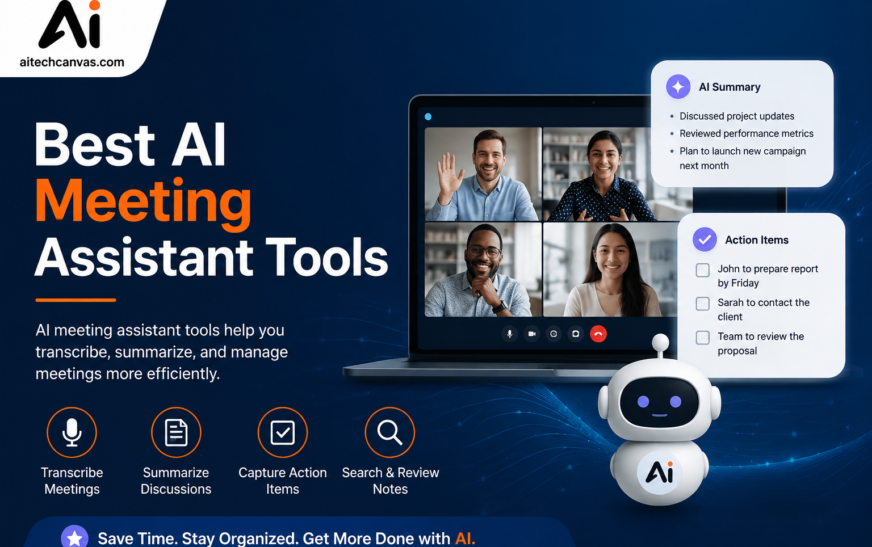
Still taking meeting notes manually? AI meeting assistants can now handle transcription, summaries, action items, follow-ups, and meeting insights helping teams save time and stay organized. The best AI meeting assistant tools can automatically transcribe conversations, generate meeting summaries, identify action items, record meetings, and organize searchable notes. The right tool depends on your meeting platform, team size, budget, integrations, privacy requirements, and whether you need features for sales, project management, or remote collaboration.
Meetings are important for businesses, remote teams, sales professionals, managers, and consultants, but keeping track of everything discussed can be difficult. Someone has to take notes, remember decisions, assign tasks, and send follow-up messages after the meeting. An AI meeting assistant can automate many of these repetitive tasks. Modern AI meeting assistant software can listen to conversations, create transcripts, summarize important points, identify speakers, and turn discussions into actionable tasks.
From an AI meeting note taker to an AI meeting recorder and AI meeting summarizer, these tools are becoming useful AI meeting productivity tools for individuals and organizations. In this guide, we compare the best AI meeting assistant tools based on features, usability, integrations, pricing considerations, privacy, and different business needs.
Key Takeaways
- AI meeting assistants can automatically transcribe conversations.
- AI-generated summaries make long meetings easier to review.
- Action-item extraction helps teams identify tasks and responsibilities.
- Many tools work with Zoom, Google Meet, and Microsoft Teams.
- Sales teams can benefit from CRM meeting integration.
- Free AI meeting assistant plans can be useful for individuals and small teams.
- Privacy, security, and compliance are important when meetings contain sensitive information.
- Different tools are better suited to sales, remote teams, executives, recruiters, developers, and other professionals.
What Is an AI Meeting Assistant?
An AI meeting assistant is software that uses artificial intelligence to capture, transcribe, analyze, and summarize meeting conversations.
Instead of manually writing every important point, users can allow an AI-powered meeting assistant to create structured notes automatically.
Depending on the platform, an AI meeting assistant may provide:
- Meeting transcription
- Automatic meeting summaries
- AI meeting notes
- Speaker identification
- Meeting recordings
- Action-item extraction
- Searchable transcripts
- Meeting highlights
- AI meeting insights
- Automated follow-ups
- CRM integrations
- Productivity integrations
A good AI meeting note taker can save time by converting conversations into organized information that participants can review after the meeting.
How Do AI Meeting Assistant Tools Work?
Most AI meeting assistant tools follow a simple process.
1. Meeting Recording or Capture
The tool captures the meeting audio through a supported platform such as Zoom, Google Meet, or Microsoft Teams.
2. AI Meeting Transcription
Speech recognition converts the conversation into text. Good AI meeting transcription software can distinguish speakers and organize the conversation into a readable transcript.
3. AI Conversation Analysis
The AI analyzes the transcript to identify important topics, decisions, questions, highlights, and tasks.
4. Automatic Meeting Summaries
The system creates an AI-generated meeting summary so users do not have to read the entire transcript.
5. Action Item Extraction
AI can identify tasks and responsibilities discussed during the meeting through automatic action item extraction.
6. Follow-Up and Integration
Some platforms can help create follow-ups or connect meeting information with CRM, Slack, Google Workspace, and other productivity applications.
Key Features to Look for in an AI Meeting Assistant
Choosing the right AI meeting assistant software requires more than checking whether it can record a meeting. Look at transcription quality, summaries, integrations, action items, analytics, privacy, and pricing.
AI Meeting Transcription
AI meeting transcription is one of the most important features to consider.
The best AI meeting transcription tools should convert conversations into readable text while handling multiple speakers, accents, background noise, and technical terminology as accurately as possible.
Look for features such as:
- Real-time meeting transcription
- Speaker identification
- Searchable transcripts
- Multiple language support
- Timestamped transcripts
- Transcript editing
If you attend frequent meetings, accurate transcription can make a major difference in how quickly you can review discussions.
Automatic Meeting Summaries
Reading an hour-long transcript is not always practical. An AI meeting summarizer can condense the discussion into important points.
Automatic meeting summaries may include:
- Main discussion points
- Decisions
- Important questions
- Key highlights
- Tasks
- Next steps
This feature is especially useful for managers and remote teams that need to quickly understand what happened during meetings.
Action Item Extraction
Meetings often end with several tasks, but those tasks can easily be forgotten. AI action items from meetings can help identify responsibilities and next steps automatically. For example, an AI assistant may recognize that one employee needs to prepare a report while another needs to contact a customer. When businesses use AI-powered tools, exploring the Best AI Developer Platforms can also help teams build or integrate smarter meeting workflows. This can turn a simple meeting transcript into an actionable task list.
Meeting Recording
An AI meeting recorder can capture conversations so participants can review them later.
Meeting recording features may include:
- Audio recording
- Video recording
- Automatic transcription
- Searchable recordings
- Meeting highlights
- Timestamped notes
Users should always understand their organization’s recording policies and obtain appropriate consent where required.
Searchable Meeting Notes
With traditional notes, finding an old discussion can be difficult. AI tools can create searchable meeting transcripts and AI meeting notes that make previous conversations easier to locate.
You can search for:
- Names
- Projects
- Customers
- Decisions
- Keywords
- Tasks
- Specific topics
This makes AI meeting assistants particularly useful for teams that hold many meetings each week.
CRM and Productivity Integrations
Integrations can make an AI meeting assistant more valuable.
Look for CRM meeting integration and connections with tools such as:
- Slack
- Google Workspace
- CRM platforms
- Project management software
- Calendar applications
- Communication platforms
Strong AI meeting assistant integrations can help move information from meetings into existing business workflows without requiring users to copy everything manually.
10 Best AI Meeting Assistant Tools
The following tools represent different approaches to AI meeting notes, transcription, conversation intelligence, meeting analytics, and productivity.
1. Fathom
Fathom is an AI meeting assistant focused on automatically capturing and summarizing online meetings.
It can be useful for people who want meeting transcripts, summaries, highlights, and actionable information without manually taking detailed notes.
Best for: Fathom is Meeting summaries and productivity
Key features:
- AI meeting transcription
- Meeting summaries
- Highlights
- Action items
- Meeting recordings
- Workflow integrations
2. Fireflies.ai
Fireflies.ai is designed around meeting transcription, searchable conversations, collaboration, and integrations.
It can help teams build a searchable record of their meetings and find information from previous conversations.
Best for: Teams and searchable meeting knowledge
Key features:
- AI transcription
- Meeting summaries
- Searchable transcripts
- Action items
- Integrations
- Team collaboration
3. Otter.ai
Otter.ai is well known for AI-powered transcription and meeting notes.
It can help users turn spoken conversations into searchable text and generate summaries from meetings.
Best for: AI meeting notes and transcription
Key features:
- AI meeting transcription
- Speaker identification
- Meeting notes
- Summaries
- Search
- Collaboration
4. tl;dv
tl;dv focuses on recording, transcription, summaries, and meeting clips for remote teams.
It can be useful when teams need to share important sections of meetings without requiring everyone to watch the entire recording.
Best for: Remote teams
Key features:
- Meeting recording
- Transcription
- AI summaries
- Meeting highlights
- Clips
- Team collaboration
5. Avoma
Avoma focuses strongly on meeting intelligence and sales workflows.
Sales organizations can use it to capture customer conversations, extract useful information, and connect meeting data with business processes.
Best for: Sales teams and conversation intelligence
Key features:
- Meeting transcription
- AI summaries
- Conversation intelligence
- Sales insights
- CRM integration
- Action items
6. Granola
Granola takes an AI-assisted approach to meeting notes and can help users create more useful notes from conversations.
Best for: Professionals who want AI-enhanced meeting notes
Key features:
- AI meeting notes
- Note enhancement
- Meeting context
- Summaries
- Productivity workflows
7. Fellow
Fellow combines meeting management with notes, agendas, action items, and team collaboration.
Best for: Teams that want meeting notes connected to workflows
Key features:
- Meeting agendas
- AI meeting notes
- Action items
- Team collaboration
- Follow-ups
- Meeting management
8. Read AI
Read AI focuses on meeting intelligence and analytics in addition to summaries and transcription.
Best for: Meeting insights and analytics
Key features:
- AI transcription
- Meeting summaries
- Meeting analytics
- Speaker insights
- Meeting highlights
- Productivity insights
9. Krisp
Krisp is widely associated with AI-powered audio enhancement and meeting productivity features.
Best for: Clearer online meetings and audio-focused workflows
Key features:
- AI noise cancellation
- Meeting transcription
- Meeting assistance
- Audio enhancement
- Productivity features
10. MeetGeek
MeetGeek provides meeting recording, transcription, summaries, and meeting insights.
It can be useful for organizations looking to turn meeting conversations into structured information.
Best for: Automated meeting workflows
Key features:
- AI transcription
- Meeting summaries
- Action items
- Recording
- Integrations
- Meeting analytics
Best AI Meeting Assistant for Different Needs
There is no single solution that is perfect for every user. Your ideal choice depends on your workflow, meeting platform, industry, and budget.
Best Overall AI Meeting Assistant
For overall meeting productivity, look for a tool that combines transcription, summaries, action items, recording, search, and integrations.
The best AI meeting assistant tools should reduce manual work rather than simply create another place to store meeting recordings.
Best Free AI Meeting Assistant
A free AI meeting assistant can be useful for students, freelancers, and individuals who want to test AI-powered meeting notes.
Before choosing a free plan, check:
- Monthly transcription limits
- Recording limits
- Storage
- Summary features
- Integrations
- Export options
Best AI Meeting Assistant for Business
The best AI meeting assistant for business should offer reliable transcription, team collaboration, integrations, security controls, and scalable pricing.
Larger companies may also need an enterprise AI meeting assistant with administrative and compliance features.
Best AI Meeting Assistant for Teams
The best solution for teams should make it easy to share meeting notes, find previous conversations, assign tasks, and collaborate after meetings.
Features such as shared transcripts, action items, integrations, and searchable meeting history can be especially valuable.
Best AI Meeting Assistant for Small Business
For small businesses, affordability and ease of use are often more important than advanced analytics.
An affordable AI meeting assistant should provide essential transcription, summaries, notes, and integrations without unnecessary complexity.
Best AI Meeting Assistant for Sales
Sales teams can benefit from conversation intelligence, CRM integration, customer insights, and automatic follow-ups.
A sales-focused AI assistant can help capture:
- Customer objections
- Buying signals
- Follow-up tasks
- Customer requirements
- Sales opportunities
- Important commitments
Best AI Meeting Assistant for Professionals
Consultants, freelancers, executives, and other professionals can benefit from AI tools that quickly transform conversations into organized notes and tasks.
Best AI Meeting Assistant for Zoom
When selecting an AI meeting assistant for Zoom, check whether it supports recording, transcription, summaries, action items, and calendar workflows.
Best AI Meeting Assistant for Google Meet
An AI meeting assistant for Google Meet can be useful for organizations already using Google Workspace.
Look for compatibility with Google Calendar, Google Drive, Gmail, and other productivity workflows.
Best AI Meeting Assistant for Microsoft Teams
Organizations using Microsoft 365 should consider an AI meeting assistant for Microsoft Teams that works effectively with their existing collaboration and productivity environment.
AI Meeting Assistant for Different Industries
AI meeting assistants can support different workflows depending on the industry.
AI Meeting Assistant for Sales
Useful for customer calls, sales discovery meetings, demos, and follow-ups.
AI Meeting Assistant for Marketing Teams
Marketing teams can use AI notes and summaries to capture campaign discussions, content decisions, and project updates.
AI Meeting Assistant for Customer Support
Support teams can use transcripts to review customer conversations and identify recurring issues.
AI Meeting Assistant for Project Managers
Project managers can use automatic summaries and task extraction to track decisions, deadlines, and responsibilities.
AI Meeting Assistant for Developers
Development teams can use searchable meeting transcripts to capture technical decisions, requirements, and project discussions.
AI Meeting Assistant for Consultants
Consultants can use AI meeting notes to document client requirements and create follow-up tasks.
AI Meeting Assistant for Recruiters
Recruiters can use meeting transcription and summaries to organize interview discussions and candidate-related notes.
AI Meeting Assistant for Executives
Executives can use automatic summaries to quickly review important meetings without reading complete transcripts.
AI Meeting Assistant for Education
Teachers, students, and educational teams can use meeting transcription and summaries for lectures, discussions, and collaborative sessions.
AI Meeting Assistant for Healthcare Meetings
Healthcare organizations should pay particular attention to privacy, security, consent, and compliance when evaluating meeting-assistance technologies.
AI Meeting Assistant vs Traditional Note-Taking
Traditional note-taking requires participants to listen, understand, remember, and write at the same time.
An AI meeting assistant can automate much of this process.
| Feature | AI Meeting Assistant | Traditional Note-Taking |
| Transcription | Automatic | Manual |
| Meeting summaries | AI-generated | Manual |
| Action items | AI-assisted | Manual |
| Searchable transcript | Usually available | Usually unavailable |
| Speaker identification | Available in many tools | Manual |
| Follow-ups | Can be automated | Manual |
| Meeting analytics | Some tools provide it | No |
The main advantage is not simply saving typing time. It allows participants to focus more on the conversation itself.
AI Meeting Assistant Alternatives
If a tool does not match your workflow, you can compare alternatives based on pricing, features, integrations, and usability.
Popular comparison searches include:
- Fathom vs Otter
- Fireflies vs Otter
- Fathom vs Fireflies
- Otter vs Fireflies
- Best Otter alternatives
- Best Fireflies alternatives
- Best Fathom alternatives
- AI meeting assistant alternatives
When comparing alternatives, avoid choosing based only on brand popularity. Look at your actual requirements.
Benefits of Using AI Meeting Assistants
AI meeting productivity tools can provide several practical benefits.
Save Time
Automatic notes and summaries reduce the time spent documenting meetings.
Improve Follow-Up
AI can identify tasks and help users remember what needs to happen next.
Make Meetings Searchable
Searchable transcripts make old conversations easier to find.
Improve Team Collaboration
Team members who missed a meeting can review summaries and important highlights.
Capture More Information
Instead of relying on handwritten notes, users can maintain a searchable record of discussions.
Generate Meeting Insights
Some platforms provide AI meeting insights and AI meeting analytics to help teams understand meeting patterns and participation.
AI Meeting Assistant Privacy and Security
Privacy should be a major consideration when choosing an AI meeting assistant.
Meeting recordings and transcripts can contain confidential business information, customer details, financial discussions, or other sensitive data.
Before choosing a platform, review:
- AI meeting assistant privacy policies
- Data retention practices
- Encryption
- Access controls
- Recording permissions
- Data processing
- AI training policies
- Compliance certifications
- Enterprise security controls
A secure AI meeting assistant should clearly explain how meeting data is collected, processed, stored, and protected.
Organizations should also consider whether they need a private AI meeting assistant, enterprise controls, or a bot-free AI meeting assistant.
Are AI Meeting Assistant Tools Worth It?
AI meeting assistants can be worthwhile for professionals and teams that spend significant time in meetings.
They can reduce repetitive work by automating:
- Meeting transcription
- Meeting notes
- Summaries
- Action items
- Follow-ups
- Search
- Meeting documentation
However, not every user needs an advanced platform. Someone who attends only a few meetings per month may prefer a simple or free option, while a sales organization may need CRM integration and conversation analytics.
The best AI meeting assistant tools are therefore the ones that solve your specific meeting and workflow problems without adding unnecessary complexity.
How to Choose the Best AI Meeting Assistant
Before selecting a tool, consider these factors:
1. Transcription Accuracy
Check whether the platform handles different speakers, accents, terminology, and background noise.
2. Meeting Platforms
Make sure it supports the platforms your team uses, such as Zoom, Google Meet, or Microsoft Teams.
3. Summary Quality
A useful AI summary should capture important information rather than simply shorten the transcript.
4. Action Items
Look for automatic task extraction and follow-up features.
5. Integrations
Check CRM, Slack, Google Workspace, calendar, and project-management integrations.
6. Pricing
Compare free plans, paid plans, user limits, meeting limits, storage, and advanced features.
7. Privacy
Understand how the provider stores and processes meeting recordings and transcripts.
8. Team Collaboration
If multiple people use the tool, shared notes, search, permissions, and collaboration features become important.
9. Industry Requirements
Businesses in regulated industries may need additional security and compliance controls.
10. Ease of Use
The best solution should fit naturally into your existing workflow rather than requiring extensive manual setup.
Conclusion
AI is changing the way people record, understand, and follow up on meetings. From transcription and automatic summaries to action items, searchable notes, analytics, and integrations, these tools can turn conversations into useful business information.
The best AI meeting assistant tools will depend on your specific needs. Individuals may prioritize free plans and simple AI meeting notes, while businesses may need advanced integrations, CRM workflows, security, analytics, and enterprise controls.
Before making a decision, compare features, pricing, supported meeting platforms, integrations, transcription quality, and privacy policies. Choosing a tool that fits your actual workflow can help you spend less time documenting meetings and more time acting on what was discussed.
FAQs
What Is the Best AI Meeting Assistant?
The best AI meeting assistant depends on your requirements. Consider transcription accuracy, summaries, action items, integrations, pricing, platform support, and privacy.
What Is the Best Free AI Meeting Assistant?
A free AI meeting assistant can be a good option for individuals who have limited meeting requirements. Compare transcription limits, summaries, storage, and integrations before choosing.
What Is the Best AI Meeting Assistant in 2026?
The best option depends on your use case, including whether you need sales intelligence, team collaboration, meeting analytics, transcription, or simple AI notes.
Is Fathom Better Than Otter?
Both tools can be useful, but the better choice depends on the features you need, such as meeting summaries, transcription, collaboration, integrations, and workflow requirements.
Is Fireflies Better Than Otter?
Fireflies and Otter focus on different aspects of AI-powered meeting productivity. Compare transcription, summaries, integrations, search, team features, and pricing.
Can AI Meeting Assistants Record Zoom Meetings?
Many AI meeting assistants support Zoom recording or meeting capture, but capabilities vary by platform and plan.
Can AI Meeting Assistants Create Action Items?
Yes. Many modern tools can identify tasks, responsibilities, and follow-up items from meeting conversations.
Can AI Meeting Assistants Take Meeting Notes?
Yes. AI meeting note takers can automatically create structured notes from meeting conversations and transcripts.
Are AI Meeting Assistants Safe?
They can be safe when appropriate security controls are in place, but users should review privacy policies, data retention, access controls, and compliance requirements before using them.
What Is the Best AI Meeting Assistant for Business?
For business use, prioritize reliable transcription, summaries, action items, integrations, team collaboration, security, scalability, and administrative controls.
Which AI Meeting Assistant Is Best for Teams?
The best choice for teams depends on collaboration needs, meeting volume, integrations, pricing, and whether the team needs shared searchable meeting records.
Which AI Meeting Assistant Is Best for Zoom?
Choose an option with strong Zoom support, reliable transcription, automatic summaries, recording capabilities, and useful integrations.